The Best Streaming Devices in 2026
Which streaming box (or stick) you should actually buy — broken down by household, room, and budget. No hype.
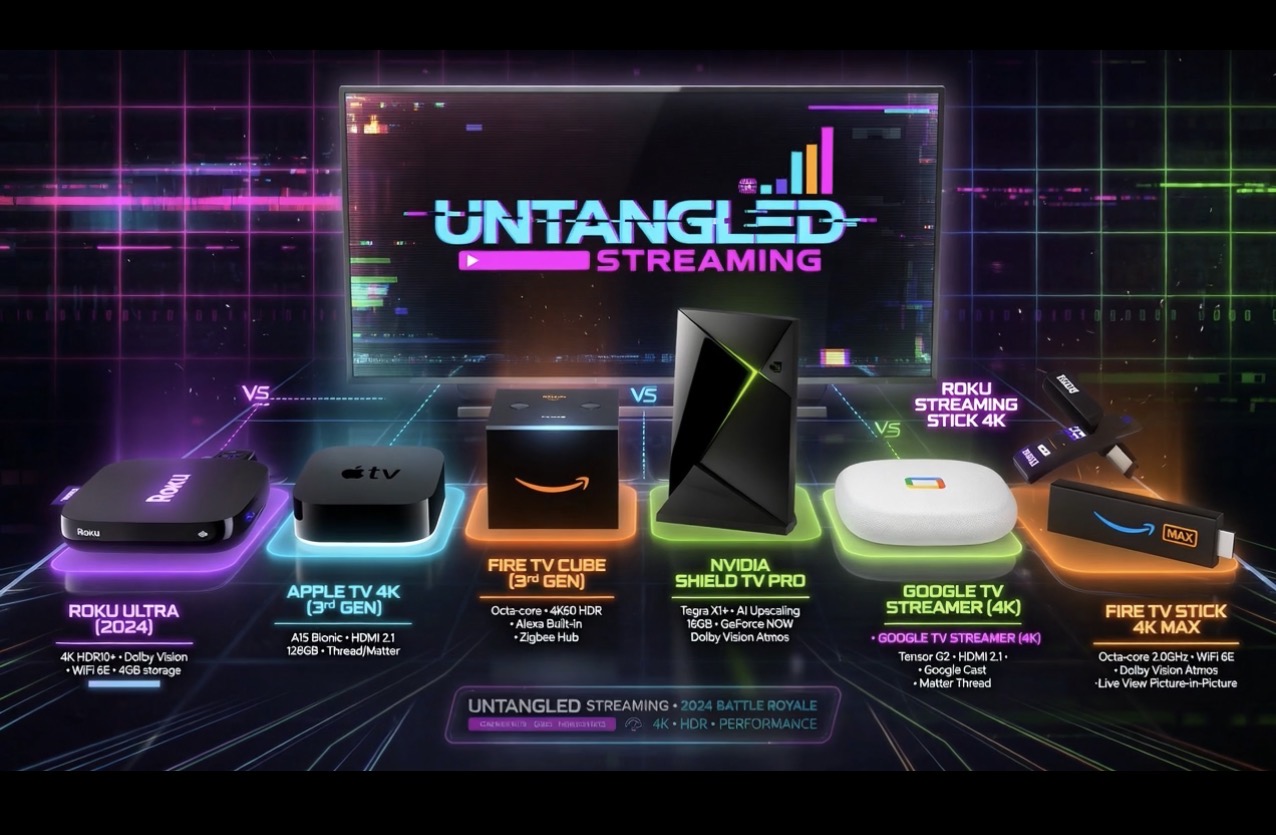
Our Take
After installing thousands of streaming devices in client homes over the years, the answer to "which one should I buy?" almost always comes down to four questions: which phones does your family use, how many TVs are you outfitting, what's your budget, and do you care about power-user features like Plex or cloud gaming. Get those right and the pick is straightforward.
The good news is the streaming-device market has matured. Every box on this list does the basic job — Netflix, Disney+, Max, YouTube TV — well enough that you can't really go wrong. The differences are about ecosystem fit, remote design, longevity, and the small daily frictions that add up over five years of use.
This page is a directory. Each device gets a quick honest verdict and a link to the full review. Below that, a buying guide by household type — main TV vs secondary, Apple vs Amazon vs Google, budget vs premium. If you only have 30 seconds, skip to the comparison table.
Quick answers for the four most common situations
Most cord-cutters, mixed-device household, one main TV — Get the Roku Ultra. Best remote on the market, neutral ecosystem, ethernet built in, $30 cheaper than Apple TV. Check the current Roku Ultra price on Amazon →
Your house runs on iPhones — Get the Apple TV 4K. AirPlay, HomeKit, and Apple One make this worth the premium. Skip the Wi-Fi-only model — spend the extra $20 for ethernet.
You run a Plex server, cloud-game, or have a big library of older 1080p content — Get the Nvidia Shield TV Pro. Twice the price of the Roku, but the only box that genuinely deserves the "power user" label.
You're buying for a secondary room or guest bedroom — Get the Roku Streaming Stick 4K or the Fire TV Stick 4K Max. Half the price of any box, 90% of the experience.
The full lineup at a glance
| Device | Best for | Price | Why I install it |
|---|---|---|---|
| Roku Ultra (2024) | Most homes, main TV | $79–$99 | Best remote (headphone jack, lost-remote finder, backlit), ethernet, neutral interface. The default pick. |
| Apple TV 4K (3rd gen) | iPhone households | $199–$249 | AirPlay + HomeKit hub. Premium feel. Longest software support window of any box. |
| Fire TV Cube (3rd gen) | Amazon/Alexa households | $139 | Hands-free Alexa, Wi-Fi 6E, HDMI input for controlling a cable box through the same remote. |
| Nvidia Shield TV Pro | Power users | $199–$219 | Plex server, AI upscaling for 1080p content, GeForce Now cloud gaming. Six years old and still the most capable streamer made. |
| Google TV Streamer (4K) | Google households + smart-home builders | $99 | Doubles as a Matter and Thread hub — cheapest smart-home hub on the market. |
| Roku Streaming Stick 4K | Secondary TVs, budget | $29–$49 | Same Roku interface, half the Ultra's price. The mid-tier stick I install in guest rooms and kids' rooms. |
| Fire TV Stick 4K Max | Prime members, secondary TVs | $39–$59 | Wi-Fi 6E edge in dense apartments. Right for Prime members who don't mind ads. |
When to buy each one
Roku Ultra (2024) — the default pick
You want the streaming experience to "just work" without committing to an ecosystem. Roku is the only major streamer that doesn't push you into Apple's, Amazon's, or Google's content silo. The home screen shows the apps you installed in the order you arranged them, full stop.
Someone in your house keeps losing the remote. Press the button on the box, the remote beeps. After installing dozens of these, I can tell you this feature pays for itself within the first year.
You watch late-night TV next to a sleeping partner or kids. The Voice Remote Pro 2 has a headphone jack — plug $10 wired headphones into it and the TV audio routes there. Apple has no equivalent without buying AirPods.
You want ethernet without paying an upcharge. Apple charges $20 extra for ethernet. Roku Ultra has it standard. With ethernet, every Wi-Fi quirk in your house goes away — drop the cable, drop the buffering complaints.
Apple TV 4K (3rd gen) — the premium pick for iPhone houses
Most people in your house use iPhones. AirPlay only works from Apple devices, and it's the killer feature once you actually start using it. Photos at Thanksgiving, the video your kid wants to show you, the workout in another room — one tap, it's on the TV.
You're already paying for Apple services. Apple One, Apple TV+, Apple Music, Apple Arcade — they all run more smoothly here than they do on any other box.
You want a HomeKit smart-home hub. (Wi-Fi + Ethernet model only.) Controls HomeKit and Matter devices from anywhere and acts as a Thread border router. Cheapest path to a real smart-home brain in the Apple ecosystem.
You want the longest lifespan. The Apple TV's A15 chip is overbuilt for streaming. Five-year-old units in client homes still feel new. Plan on 6–8 years of use.
Fire TV Cube (3rd gen) — the Alexa household pick
You already have Echo speakers everywhere. The Cube has a microphone in the box itself — say "Alexa, play Bosch" from across the room and the TV turns on and starts playing. No remote needed.
You have a cable box you still need to control. The Cube has an HDMI input — plug your cable box into it and Alexa can switch inputs and tune channels for you, all through one remote. This is the Cube's killer feature and most people don't set it up.
You want Wi-Fi 6E in a dense apartment. The Cube has the 6 GHz band. In an apartment building with 40 Wi-Fi networks fighting for airtime, that matters.
Nvidia Shield TV Pro — the power user box
You run a Plex server. The Shield is the only streaming box that doubles as a Plex Media Server host, not just a client. One device hosts your library AND plays it on the TV. No NAS or computer needed.
You watch a lot of older or lower-resolution content. The AI Enhanced Resolution feature actually works — older 1080p material looks meaningfully sharper than it does on any other streamer. Not marketing, real visible improvement.
You want to cloud-game on your TV. GeForce Now Ultimate streams RTX-class PC games to the Shield. On wired ethernet it's shockingly good — easily the best cloud-gaming setup short of a console.
You emulate retro games. Built-in support for PS5, Xbox, and 8BitDo controllers via Bluetooth. RetroArch and other emulators run natively.
Google TV Streamer — the smart-home and Google household pick
Your house runs on Google. Nest cameras, Nest doorbells, Google Home speakers, YouTube TV. The Streamer is the only streaming box where all of that feels native. Say "Hey Google, show the front door" and the Nest camera feed pops up on the TV.
You're building out a Matter and Thread smart home. The Streamer is both a Matter controller and a Thread border router. At $99 it's the cheapest device that does either job — and the only streaming box that does both.
You want better content recommendations than Roku. Google's recommendation engine knows what you watch on YouTube, what you've searched, and what's in your Google account. The home screen surfaces real recommendations, not sponsored tiles.
Full Google TV Streamer review →
Roku Streaming Stick 4K — the budget pick
You're outfitting a secondary TV — guest room, kids' room, basement. Same Roku interface as the Ultra at half the price. Worth the savings on any TV you don't watch four hours a day.
You bought a smart TV and the built-in apps are slow. Plug the Stick into an HDMI port and the TV gets a brain transplant. Faster, cleaner, no manufacturer bloat.
You travel and want a streamer that fits in a laptop bag. Hotel TVs, Airbnbs, parents' houses. The Stick + a $10 HDMI extender goes anywhere.
Full Roku Streaming Stick 4K review →
Fire TV Stick 4K Max — the Prime member's budget pick
You watch a lot of Prime Video and live in Alexa. The home screen surfaces Prime content first, and Alexa integration is native. Right home for Amazon-deep households.
Your secondary TV is in a Wi-Fi dead zone. The Stick's Wi-Fi 6E support gives it the longest reach of any streaming stick. Worth $10 more than the Roku Stick if your Wi-Fi is the actual bottleneck.
You want the cheapest path to 4K HDR. Often on sale for $25–$30. The cheapest 4K-capable stick worth buying.
Full Fire TV Stick 4K Max review →
The buying guide by household type
"We're a one-TV household"
Get the Roku Ultra if your phones are mixed, the Apple TV 4K if everyone has an iPhone. Don't overthink it.
"We have three or four TVs"
One premium box on the main TV (Roku Ultra or Apple TV), Roku Streaming Stick 4K on every other TV. Cheapest way to run a consistent setup across the whole house — and the Roku interface is the same on the Stick and the Ultra, so the muscle memory transfers.
"We're deep in Apple"
Apple TV 4K on every TV. Mixed Apple TVs and Rokus is fine technically, but the AirPlay experience is smoother if every TV is an Apple TV — your iPhone sees them all in one list.
"We're deep in Amazon"
Fire TV Cube on the main TV (hands-free Alexa earns its keep), Fire TV Stick 4K Max on every other TV. Stay in the same family.
"We're deep in Google"
Google TV Streamer on the main TV. Roku Streaming Stick 4K on secondaries — Google's stick equivalent (Chromecast with Google TV) is being sunset. Stick with Roku for budget rooms even in a Google house.
"I run a Plex server with 8 TB of movies"
Nvidia Shield Pro on the main TV. Cheaper Rokus on the rest — the Shield's power doesn't translate to better streaming, just better Plex playback. One Shield is enough for the household.
"I have a non-smart TV that still works fine"
Roku Ultra or Apple TV 4K depending on your phones. A working TV with a modern streaming box ages much better than a new smart TV with built-in apps that get abandoned by the manufacturer in 3–4 years.
What doesn't matter (and what to skip)
Don't pay extra for "AI-enhanced" features on most boxes. With one exception (the Shield's actual AI upscaling), every other "AI" feature on a streaming device is a marketing label on something basic.
Don't buy a 1080p-only stick in 2026. Even if your TV is 1080p, a 4K stick is the same money and future-proofs you for one TV cycle.
Don't rely on your smart TV's built-in apps. Samsung, LG, Sony, Hisense, TCL — every smart TV's built-in interface starts aging the day you take it out of the box, and most manufacturers stop pushing updates within 3 years. A $50 streaming stick keeps your TV current for the life of the TV.
Don't buy a Chromecast in 2026. Google's killed the Chromecast line and replaced it with the Google TV Streamer. Anything still being sold under the old Chromecast name is end-of-life inventory.
Skip the "premium" Roku Ultra accessories. The included remote does everything you need. The third-party "upgraded" Roku remotes lose features.
A quick word on smart TVs
Built-in smart TV apps are the worst version of the streaming experience. Manufacturers cut software corners to hit price points, and the platforms (Samsung Tizen, LG webOS, Sony Google TV, Vizio SmartCast) all age faster than the TV's panel does. Every TV I install gets a real streaming box plugged into it on day one — even if the TV "has Netflix built in."
The exception: Roku TVs. Same Roku OS as the Ultra, baked in. If you're shopping for a TV and want one less box, a Roku TV is a defensible choice. Everyone else, plan on the streaming box being a separate $50–$150 purchase.
Common questions
Should I keep my old Roku/Apple TV/Fire TV box and not upgrade? If it's 3+ years old and feels sluggish, replace it. If it's 5+ years old, you're missing real picture-quality upgrades (Dolby Vision, HDR10+, modern HDMI). If it still feels fast and supports the apps you use, keep it — none of these boxes are an annual upgrade.
Will any of these work with my older TV? Yes. Every box on this list will downscale 4K content to a 1080p TV, and several will downscale to 720p. The picture won't be as sharp as 4K material, but the box itself works fine.
Do I need a soundbar or can I use the TV speakers? Streaming boxes pass through Dolby Atmos and high-bitrate audio when there's something downstream that can play it. With TV speakers you get stereo. With a soundbar you get the upgrade. Either way, the streaming box does its job.
How much does internet speed actually matter? For 4K HDR streaming, plan on 25 Mbps minimum per simultaneous stream. Most home internet plans cover this easily. If your Wi-Fi is the bottleneck, the answer is wired ethernet to the streaming box first, then a Wi-Fi 6 or 7 router second — see the Wi-Fi 6 vs 7 guide for the long version.
Closing recommendation
If you only read one paragraph: most homes should buy the Roku Ultra. iPhone households should buy the Apple TV 4K. Power users should buy the Nvidia Shield Pro. For every secondary room, get the Roku Streaming Stick 4K. That's the answer for 95% of the families I work with, and it's the answer for almost every reader landing on this page.
The full reviews go deeper on each device. Start with the box that matches your household above, click through, and the question of "which one should I buy?" becomes "yes, this one." Run the quiz if you want a personalized pick based on your ZIP code and what you currently pay for TV.