Fire TV Stick 4K Max Review
The right stick for the wrong room is how most people use this — here's where it actually belongs.




Our Take
Fire Sticks have a specific job, and after years of installing them in client homes I can tell you exactly what it is. The Fire TV Stick 4K Max is a secondary-TV streamer — it belongs in the guest room, the kids' room, the gym TV in the basement, the spare bedroom nobody watches much. On those TVs, $40–$60 for 4K HDR is a smart buy and the rough edges don't matter.
Where this stick gets clients in trouble is on the main TV. The processor is weak and starts feeling sluggish after 2–3 years of daily use. The home screen is loud with Amazon ads and sponsored content rows. The remote is the cheap one in the lineup — no headphone jack, no backlit buttons, no lost-remote finder. None of that matters in a guest room. All of it matters in the room where your family watches 4 hours a night.
If you're already deep in the Amazon ecosystem — heavy Prime Video viewer, Echo speakers throughout the house, Ring doorbell on the porch — Fire TV pulls everything together in ways Roku and Apple TV can't. That's the one case where this stick earns a spot on a primary TV. For everyone else, this is a great cheap box for a TV you barely use.
When to buy it
You're putting it on a secondary TV. Guest room, gym TV, kids' room, basement, garage. Anywhere you want cheap 4K streaming without spending real money. The Fire Stick is the right tier for these rooms — every major app, full HDR support, and the weak processor is fine when the TV gets used a few hours a week.
You're a heavy Prime Video viewer. Thursday Night Football, Reacher, Jack Ryan, all the Amazon Originals. Fire TV puts Prime Video front-and-center and plays it more smoothly than any other streaming platform. If Prime Video is half of your watching, this is the only place it feels native.
You're already deep in the Alexa ecosystem. Echo speakers in multiple rooms, Alexa routines, Ring doorbell. The Fire Stick slots into that world. Pair it to your Echo and you can voice-control the TV from across the room — the same way Apple TV behaves in a HomeKit house.
You live in a dense apartment building. Wi-Fi 6E support is the Fire Stick's real spec edge over the Roku Streaming Stick 4K. The 6 GHz band is mostly empty in 2026, so in a crowded Wi-Fi environment this measurably helps. In a single-family house with one router, you won't notice.
You catch it on sale. Amazon prices these on rolling promos. List is $59, but Prime Day and Black Friday consistently bring it to $25–$35. At that price, the value math gets easy.
You want a backup streamer for travel. Throws in a bag, plugs into any hotel TV, signs into your apps wherever you are. At $40, losing one isn't a tragedy. Roku and Apple TV are both too expensive to risk in a suitcase.
When to skip it
It's going on your main TV. Don't do it. The processor will start feeling slow within 2–3 years, the ads will wear on you, and the remote will frustrate everyone who lives in the house. Spend $40 more on a Roku Ultra, or step up to the Fire TV Cube if you want the Amazon experience without the budget-stick compromises.
You're not in the Amazon ecosystem. No Prime membership, no Echo speakers, no Ring doorbell, no shopping on Amazon. The Fire Stick's whole reason for being is integrating that stuff. Without it, the Roku Streaming Stick 4K is the same price with none of the upsells.
You have iPhones in the house. No AirPlay, no HomeKit. If your family wants to send photos and videos from iPhones to the TV, this can't do it. Apple TV is the obvious pick.
You want a remote that earns its keep. No headphone jack for late-night TV, no backlit buttons, no lost-remote finder, disposable AAA batteries. Roku ships all of that at the same price tier — this is the single biggest reason most installers recommend Roku over Fire TV on a budget.
Key features (and what they actually mean for you)
Wi-Fi 6E — the real spec edge over Roku at this price
The Fire TV Stick 4K Max is the only streaming stick under $60 with Wi-Fi 6E support. The 6 GHz band is the new lane that isn't crowded yet.
📶 In plain English: older Wi-Fi (2.4 GHz, 5 GHz) is increasingly crowded — your neighbors, your phone, the microwave, the smart bulbs all share those bands. The 6 GHz band is mostly empty in 2026. You need both a Wi-Fi 6E router AND a Wi-Fi 6E device to benefit. If you have the router, this stick is the cheapest way to get a 6E client on the TV.
Dolby Vision, HDR10+, Dolby Atmos passthrough
Every premium picture and audio format used by the streaming services.
🎬 Why this matters: HDR is the "premium picture" upgrade. Dolby Vision and HDR10+ are competing formats — most streaming sticks pick one. The Fire Stick supports both. Atmos passes through to your soundbar correctly. Picture and audio quality is genuinely on par with the $100–$150 boxes — the difference is in the processor and the interface, not the picture.
Alexa voice search across every app
Press the microphone on the remote and say "find Jack Ryan." Alexa searches across every streaming service installed.
🎙️ What's actually useful: Alexa works well for finding shows and movies across apps. It's accurate. The caveat: results sometimes promote Amazon's content above the free-on-Hulu version of the same show. Not a bug exactly — just something to know.
No built-in Ethernet — Wi-Fi only
This is a stick, not a box. There's no Ethernet jack. You can add one with a $15 Amazon Ethernet Adapter for Fire TV.
🔌 When this matters: if your Wi-Fi is unreliable, you'll want the adapter. On the secondary TVs where these sticks belong, Wi-Fi is usually fine. On a primary TV with heavy streaming, you'd really want Ethernet — which is one more reason this isn't the box for a main TV.
Free Live TV — Amazon Freevee and Fire TV Channels
Hundreds of free ad-supported channels built into the home screen. No subscription, no signup.
📺 What this actually is: like the old over-the-air channels but streamed — local news, classic TV reruns, niche sports. Quality is hit and miss but it's free. Same kind of thing The Roku Channel and Pluto TV offer. Worth knowing about for a guest room TV where someone might want background TV without logging into a paid app.
The Alexa Voice Remote — the budget tier remote, and it shows
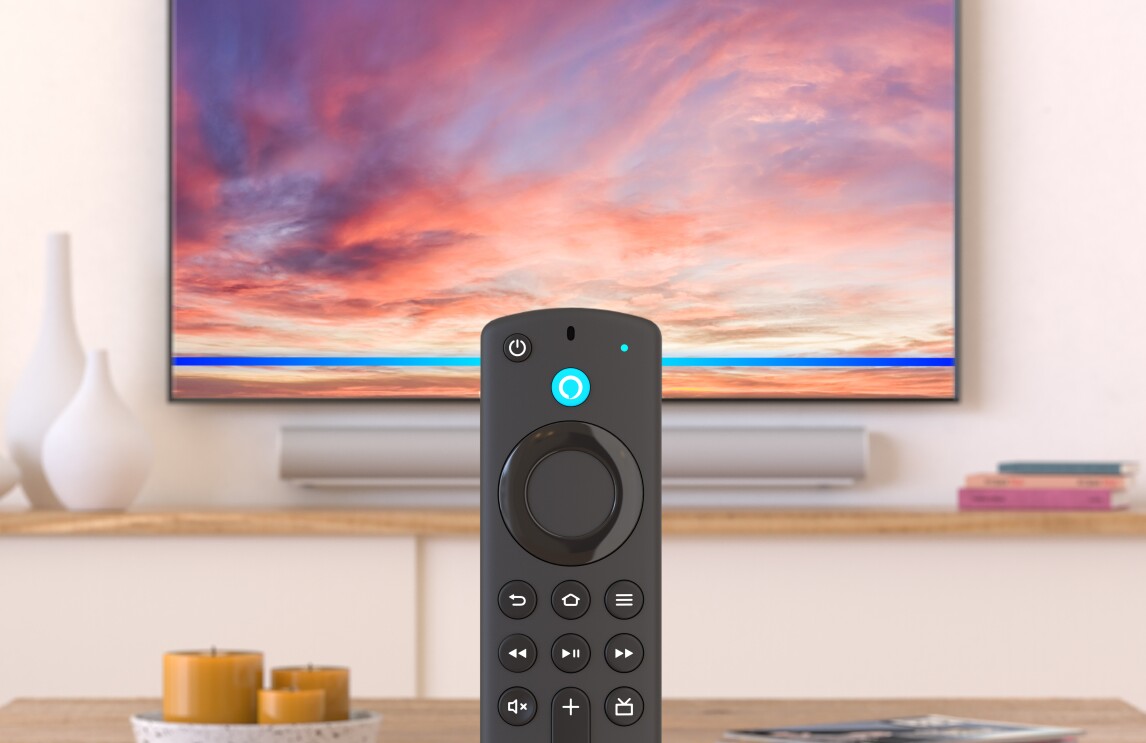
The Stick ships with the basic Alexa Voice Remote — not the Voice Remote Pro that comes with the Fire TV Cube. This is the entry-level remote in the Fire TV lineup, and the corners cut to hit a $40 price point are the corners you'll feel.
It's plastic, lightweight, runs on two disposable AAA batteries (no rechargeable USB-C like Roku), and has voice search via Alexa, four shortcut buttons hard-wired to Prime Video, Netflix, Disney+, and Hulu (not customizable), and basic TV control via IR. It does the job. It does not feel like a premium product.
No headphone jack. No lost-remote finder. No backlit buttons. No customizable shortcut buttons. None of the things that would make late-night TV easier, dark-room button-hunting easier, or finding the remote in the couch cushions easier. Roku ships all of those features on its Voice Remote Pro 2 at the same price tier — this is the single biggest reason most installers recommend Roku over Fire TV on a budget.
| Remote feature | Alexa Voice Remote (basic) | Roku Voice Remote Pro 2 | Apple Siri Remote |
|---|---|---|---|
| Voice search across apps | ✓ Alexa (press to talk) | ✓ "Hey Roku" hands-free | ✓ Siri (press to talk) |
| Headphone jack on remote | ✗ | ✓ | ✗ |
| Lost-remote finder | ✗ | ✓ | ✗ |
| Backlit buttons | ✗ | ✓ | ✗ |
| Customizable shortcut button | ✗ (4 fixed app buttons) | ✓ (2) | ✗ |
| Battery / charging | AAA disposables | Rechargeable USB-C | Built-in rechargeable, USB-C |
| Universal remote (controls TV) | ✓ IR + CEC | ✓ Most TVs | ✓ Built-in IR + CEC |
The Fire Stick remote is the right tier for the price. It's also the reason this stick belongs on a TV you watch a few hours a week, not the one where you live every night.
Closed captions, parental controls, and accessibility
Fire TV's accessibility suite is solid. Closed captions are fully customizable (font, size, color, background) under Settings → Accessibility → Captions. The Fire Stick supports Audio Streaming for Hearing Aids (ASHA) — Bluetooth hearing aids pair directly to the stick and TV audio routes to the wearer. Roku and Apple TV don't ship this.
Parental controls are PIN-locked at the OS level — you can block content ratings, lock specific apps, and restrict in-app purchases. Same system as the Fire TV Cube, same setup flow. Works well.
VoiceView screen reader for low-vision users. Audio descriptions. Voice control via Alexa (press to talk — no hands-free voice on this stick, that's a Cube-only feature).
What's missing
A processor that ages well. This is the Fire Stick's biggest long-term problem and it's the reason I push clients off it for their main TV. Every streaming stick at this price uses budget silicon, and after 2–3 years of daily use the interface starts feeling laggy — apps take longer to open, the home screen stutters when you scroll. On a guest-room TV used 5 hours a week, you'll never notice. On the family-room TV used 4 hours a night, you'll notice within two years.
Built-in Ethernet. No port, no adapter included. $15 extra if you want a wired connection. Roku Ultra has it built in.
A clean home screen. The Fire TV home page is the busiest of any major streaming platform — big banner cycling through Prime Video promos, sponsored content rows you can't fully turn off, Amazon Channels upsells. You can quiet it down with settings (see Setup Tips above) but you can't make it look like Apple TV's home. Apple TV is the cleanest of the bunch; Roku is in the middle; Fire TV is the loudest.
A better remote. Already covered above — no headphone jack, no backlit buttons, no lost-remote finder, disposable batteries. Roku's same-price remote does all of it better.
AirPlay or HomeKit. Fire TV is locked out of Apple's ecosystem. If iPhones live in the house, this matters.
Long software support. Amazon has dropped older Fire TV models from updates faster than Apple or even Roku. Expect 4–5 years of useful life on the stick. Apple TV gets 8–10 years of updates, Roku is somewhere in between. For a secondary-TV stick this is fine; for your main TV it's another reason to step up.
More photos
Ready to buy?
Price is the same at every retailer — pick whoever you already shop with. Free shipping at most.
Setup tips from a pro installer 8 tips · click to expand
- Decide which room this goes in first Guest room, kids' room, gym, or basement TV — yes. Main family-room TV or master bedroom — get a Roku Ultra or Apple TV instead. Putting this stick on a TV you watch 4 hours a day will frustrate you within a year.
- Turn off 'Featured Content' auto-play Settings → Preferences → Featured Content → 'Allow Video Autoplay' OFF and 'Allow Audio Autoplay' OFF. Stops the home screen from auto-playing loud trailers every time you turn the TV on. This is the single most important Fire TV setting.
- Set audio output to 'Best Available' Settings → Display & Sounds → Audio → Surround Sound → 'Best Available.' Default is sometimes Stereo, which wastes a Dolby Atmos soundbar.
- Skip every 'Amazon Special Offers' setup prompt During first-time setup Amazon will push subscriptions, Channels add-ons, and offers. Decline all of them. You can always add later if you actually want them.
- Limit ad tracking Settings → Preferences → Privacy Settings → 'Interest-based Ads' OFF. Won't remove all ads, but reduces personalized targeting.
- Pair the remote, then connect Wi-Fi Setup is easier this order. The remote needs to be paired before the Wi-Fi setup screen — pairing after causes more confusion than it should.
- Use Wi-Fi 6E if you have a Wi-Fi 6E router The 6 GHz band is the Fire TV Stick 4K Max's real spec edge. In a dense apartment building, this matters. With an older router, the benefit is theoretical.
- Map the TV brand to Alexa for power control If you're an Alexa household, open the Alexa app → Devices → Fire TV → Manage Equipment, and add your TV brand. Now 'Alexa, turn on the TV' works.