The honest engineering behind picture quality

Why a 1080i Fios broadcast can outperform a 1080p YouTube TV stream — and why Fubo's 4K live sports beat both. The math, the codecs, the peering disputes, and the white papers behind every claim on our market-watch table.
The signal chain, in plain English
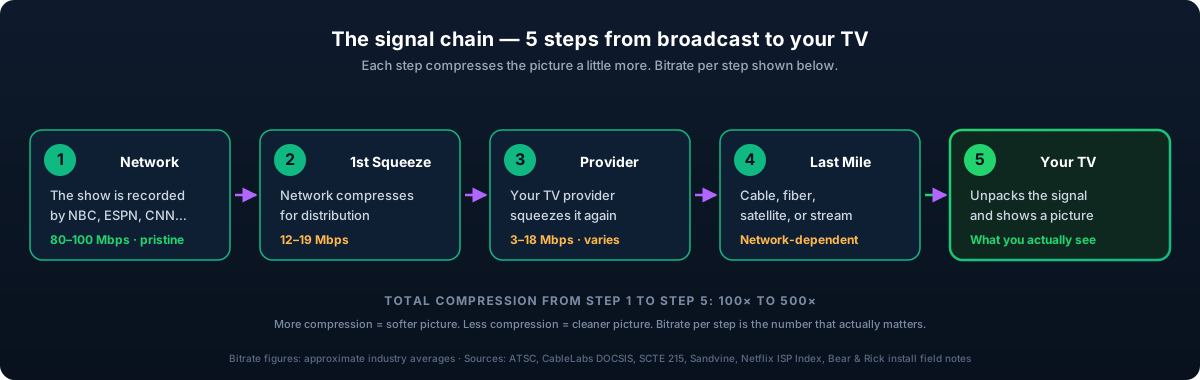
Every television picture in the United States makes the same five-stop journey from a broadcaster's master control to your living room. At each stop, some quality is given up — sometimes a little, sometimes a lot. The math that follows decides which provider's picture looks better on a 65-inch panel six feet away.
- The network produces the program. NBC, ESPN, CNN — they shoot the broadcast or receive it from a production truck on location. This is the cleanest version of the picture that exists outside the facility itself.
- The network compresses it for distribution. The master file is too large to transmit, so it is encoded once and routed via satellite or dedicated fiber to every cable, fiber, satellite, and streaming-TV provider in the country.
- Your TV provider compresses it a second time. Cable operators must fit hundreds of channels onto a single coaxial line, so they compress hard. Fiber providers have orders of magnitude more bandwidth and compress lightly. Satellite operators allocate bitrate per transponder. This stage is where one provider's picture starts to outperform another's.
- The signal travels to your address. Coaxial cable, fiber-to-the-home, a Ku- or Ka-band satellite downlink, or — for streaming — your home broadband connection.
- Your set-top, app, or smart TV decodes the picture. The compressed bitstream is reassembled into pixels and rendered on screen.
Between the master feed and your screen, the original signal is compressed by a factor of 100× to 500×. How well each provider performs that compression — and how generously each allocates bitrate to each channel — is the difference between a reference-grade picture and a soft one. The rest of this article is the engineering case for that claim, with citations.
Figure 1 — The same five steps, with the industry terminology and per-hop bitrate
The engineering
What follows is the full technical breakdown — every compression stage, every codec, every bitrate number, and the published sources behind each one. The picture-quality rankings we publish on our market-watch page rest on this analysis. If you intend to dispute those rankings, this is the file you will need to dispute.
Step 1 — Master Control
Every major US network operates a broadcast facility — typically a master control room and an attached production environment. Inside the facility, the internal mezzanine or contribution feed runs at 80–100 Mbps, encoded with broadcast-grade codecs such as JPEG-XS, MPEG-2 4:2:2 422P@HL, or AVC-Intra. This is the cleanest representation of the signal that exists outside the production trucks themselves.
That feed is then encoded for downstream distribution. The over-the-air ATSC 1.0 standard, in use since 2009, specifies MPEG-2 video at roughly 12–19 Mbps for an HD channel. ATSC 3.0 — marketed as "NextGen TV" — substitutes HEVC and is rolling out city by city. The Advanced Television Systems Committee reports the standard reaches approximately 75% of US households as of mid-2026.1
Step 2 — Distribution
Networks deliver their feeds to multichannel video programming distributors — Comcast, Charter, DirecTV, Verizon, and the streaming services — over satellite or dedicated fiber backhaul. ESPN, to take a representative example, distributes its national feeds from a master facility in Bristol, Connecticut; local affiliates feed up to the network and then back down to MVPD headends in each market.
The signal arriving at the MVPD headend is typically 12–19 Mbps MPEG-2 for SD or HD, or 7–12 Mbps HEVC for 4K. This is the input the operator will re-encode for delivery to the home.
Step 3 — The provider re-encode
This is the stage at which the four delivery architectures diverge sharply. The same source feed enters each provider's headend; very different pictures leave. What each platform does at this stage decides what you see.
Cable: Xfinity, Spectrum, Cox, Optimum
Cable operators must fit hundreds of television channels onto a single coaxial line that also carries residential broadband. They do this with QAM multiplexing: each 6 MHz QAM channel on the coax carries approximately 38.8 Mbps of usable payload after error correction, per the 256-QAM modulation defined in DOCSIS and SCTE 23.2
One QAM channel typically carries two to four HD streams simultaneously via statistical multiplexing — StatMux in industry parlance — which means each HD channel receives 9–18 Mbps. Statmux is a zero-sum allocator: bandwidth shifts dynamically to whichever stream needs it most at any given moment.
The practical consequence is that on cable, sports channels and other high-motion content frequently sit at the bottom of the bitrate budget. The macroblocking, smearing, and dark-scene banding viewers notice during a hockey or NFL broadcast is a compression artifact of this StatMux regime, not a problem with the television set.
Cable operators are also the most likely to deliver HD channels at 720p rather than 1080i. The motivation is twofold: it frees QAM bandwidth, and in many cases the source feed itself is already 720p — Comcast's Xfinity programming documentation lists 720p for many sports channels even when the network's upstream master is 1080i.3
Fiber TV: Verizon Fios, AT&T Fiber TV
Fiber providers face the opposite constraint — they have more downstream bandwidth than they can profitably consume. A single GPON fiber drop carries 2.5 Gbps downstream shared among approximately 32 homes; the newer XGS-PON architecture currently rolling out provides 10 Gbps. The fiber plant carries roughly an order of magnitude more capacity than the QAM cable plant it competes with.
Fios delivers each HD channel at approximately 17–19 Mbps in MPEG-2 or 11–13 Mbps in H.264 — at or above the bitrate of the source feed. Verizon's engineering disclosures have historically described Fios TV as a constant-bitrate service in which individual channels are not StatMux-allocated.4 The result is that the picture on Fios is the closest a US household can get to the network's source feed without an over-the-air antenna.
AT&T Fiber TV — and the legacy U-Verse service it absorbed — applies modestly more compression than Fios on the same channels, but allocates substantially more bitrate per channel than any cable operator.
Satellite: DirecTV, Dish Network
Satellite is a separate architecture. DirecTV and Dish each operate fleets of geosynchronous satellites — DirecTV at 99°W, Dish at 110°W. Each spacecraft carries a fixed number of Ku-band and Ka-band transponders, and each transponder carries a fixed payload — typically 30–35 Mbps for DirecTV's Reverse-DBS Ka-band feeds, encoded in MPEG-4 or HEVC.
Operators multiplex multiple channels per transponder, but with direct, deterministic control over bitrate allocation. Each HD channel receives a consistent 8–15 Mbps, without the variable congestion that affects cable. The trade-off is weather sensitivity: rain fade and snow accumulation on the dish degrade or interrupt the signal.
DirecTV operates three full-time native 4K channels — Live 4K, Cinema 4K, and Sports 4K — plus pay-per-view 4K events.5 Sporting events delivered in 4K HDR run at approximately 18–25 Mbps HEVC: a genuine 4K picture, not an upscaled feed.
Streaming: YouTube TV, Hulu + Live, Fubo, DirecTV Stream, Sling, Philo
This is the architecture most viewers misunderstand. A streaming service operates its own encoder farm: it ingests the network feed, re-encodes for adaptive-bitrate delivery, and serves the result through a content delivery network. The bitrate ladders, by service:
- YouTube TV, Hulu + Live, DirecTV Stream: 1080p streams at approximately 4–8 Mbps, encoded in H.264 for legacy device compatibility or HEVC on newer clients, with the player stepping down on bandwidth constraint. Sports are delivered at 60fps.
- YouTube TV 4K Plus: a $9.99/month upgrade tier. Native 4K is limited to selected MLB, NBA, and NFL playoff broadcasts plus original documentary content, at approximately 15–25 Mbps VP9 or AV1.
- Fubo: 1080p baseline at 4–8 Mbps H.264/HEVC. Native 4K HDR live sports — the broadest such roster of any US streamer — at approximately 15–25 Mbps HEVC. As of the 2025–26 season, Fubo carries roughly 60+ live 4K events per year, spanning NFL, Premier League, MLS, FIFA, MLB, and college football.6
- Sling TV, Philo: Lower bitrate ladders by design. Sling targets 3–5 Mbps for 1080p delivery, 1.5 Mbps for 720p. Philo encodes its 720p ladder at approximately 2 Mbps. These services trade compression headroom for lower CDN egress costs — the architectural basis for their lower monthly prices.
The structural difference between streaming and cable/fiber TV is the adaptive-bitrate ladder itself, delivered over HLS or DASH. The client player measures available bandwidth in real time and selects one of several encoded rungs. When bandwidth is healthy, the player serves the top rung. When bandwidth dips — congestion at the headend, Wi-Fi interference, or peak-hour saturation — the player silently substitutes a lower rung. The viewer does not see a buffering icon or an error; the picture simply becomes softer. This silent degradation is the single largest reason streaming feels less consistent than fiber or cable.
The codecs that matter
A codec is a compression algorithm. Four matter for current US television delivery, and the efficiency gap between the oldest and newest is roughly a factor of three.
- MPEG-2 (1995). The original digital television codec. In use today by ATSC 1.0 over-the-air broadcast, cable QAM lineups, and Verizon Fios TV. Adequate for HD but inefficient by modern standards — a clean 1080i picture requires 12–19 Mbps.
- H.264 / AVC (2003). Roughly twice as efficient as MPEG-2 at equal quality. The baseline encoder for AT&T Fiber TV, satellite TV, and most streaming services targeting legacy device compatibility.
- H.265 / HEVC (2013). Roughly 50% more efficient than H.264. The current standard for 4K delivery: ATSC 3.0, DirecTV 4K, Fubo 4K, YouTube TV 4K Plus, Apple TV+. Patent-licensing complexity has slowed wider adoption.
- AV1 (2018). A royalty-free codec from the Alliance for Open Media — a consortium including Google, Amazon, Netflix, Microsoft, and Apple. Approximately 30% more efficient than HEVC. YouTube relies on it heavily; Netflix uses it for premium-tier streams; broader adoption is accelerating.
A codec does not change resolution. A 1080p source encoded with H.264 at 5 Mbps and the same source encoded with AV1 at 3 Mbps will look approximately equivalent — the AV1 version uses less data to deliver the same image. This is why Fubo's HEVC 4K stream at 20 Mbps can match DirecTV satellite's MPEG-4 4K at 25 Mbps.
Bitrate over resolution: the central claim
Resolution defines the theoretical ceiling. Bitrate determines how much of that detail survives compression. Take this sentence out of the article and a reader still has the essential argument.
A 1080p frame contains 2,073,600 pixels. A 4K frame contains 8,294,400 — four times as many. Encode 4K at the same bitrate as a 1080p stream and each pixel receives one-fourth the data. The result is a blockier, softer picture than the 1080p version it nominally surpasses. This is the engineering reason that low-bitrate 4K streams can underperform high-bitrate 1080p streams on the same screen.
Netflix's published per-title encode ladder establishes the working industry thresholds:7
- 1080p H.264 — 4.5–6 Mbps for a clean picture
- 1080p HEVC or AV1 — 3–4 Mbps
- 4K HDR HEVC — 15–25 Mbps
- 4K HDR AV1 — 10–15 Mbps
Set those numbers against broadcast: a 1080i Fios channel runs 17–19 Mbps MPEG-2 — two to three times the bitrate of a 1080p HEVC streaming feed. That delta is what a viewer perceives as picture quality on a 65-inch screen.
Throttling, peering, and what happens at 9 p.m. on a Sunday
Three places along an ISP's network can affect the streaming experience in the home. Each has a different mechanism; the language used to describe each in consumer press tends to collapse them into one.
- Peering at the network edge. ISPs interconnect with backbone providers, CDNs, and content companies at internet exchange points. The quality of a path to a given streaming service depends on hop count and on whether the ISP maintains a direct peering arrangement with the service's CDN provider. Under normal conditions this is invisible to the subscriber — visible only when commercial disputes congest the path.
- Traffic shaping at the access layer. ISPs are technically capable of throttling specific protocols, ports, or destinations. Most do not, in light of net-neutrality scrutiny and regulatory exposure. The exception is mobile: Verizon and AT&T have historically capped streaming video on lower-tier plans at 480p or 720p, a practice still in effect on certain plans today.
- Last-mile congestion. Cable nodes and DSL access concentrators are shared among neighbors. At 9 p.m. on a Sunday, every household in a node area is streaming, and per-home bandwidth contracts accordingly. Cable architectures are the most susceptible; fiber-to-the-home is the least.
Case study: the 2014 Comcast–Netflix dispute
The defining case study of the modern peering era. In late 2013 and early 2014, Comcast subscribers attempting to stream Netflix experienced severe quality degradation — sustained drops to standard definition, frequent buffering. Netflix's own publicly maintained ISP Speed Index recorded Comcast subscribers receiving approximately 1.5 Mbps average bandwidth to Netflix in late 2013, down from above 2 Mbps earlier in the year.8
The root cause was a peering dispute. The transit providers Netflix used — primarily Cogent and Level 3 — had saturated their peering links into Comcast's network. Comcast demanded that Netflix pay for direct interconnection. Netflix initially refused, then capitulated in February 2014. Within weeks of the agreement, the Comcast–Netflix speed metric improved by 65% — confirming that the bottleneck had been at the peering boundary, not in the last mile.9
Whether Comcast had "throttled" Netflix is a matter of definition. Technically, no: Comcast was not shaping Netflix-specific packets. In effect, it declined to upgrade congested peering links until Netflix paid — which produced the same user-facing experience as overt throttling. This is the gray zone into which the majority of consumer "ISP is throttling me" complaints actually fall.
Why Netflix outperforms its peers on the same ISP
Netflix runs Open Connect, a private CDN program in which it ships custom cache appliances directly to participating ISPs and hosts Netflix content inside their data centers. Comcast, Charter, AT&T, Verizon, Cox, and most large US ISPs operate Open Connect appliances. When a subscriber streams Netflix, the bits never leave the ISP's network — no peering boundary, no potential for congestion-driven degradation.10
This is why Netflix consistently sits at the top of its own ISP Speed Index across providers and why its picture remains stable through peak hours. Smaller streaming services — Sling, Philo, and even Fubo — depend on commercial CDNs such as Akamai, AWS CloudFront, and Fastly, and do not maintain the same direct relationships. When peering links between a commercial CDN and an ISP saturate at peak hours, the streaming services riding those links degrade first.
The variable that matters more than throttling: your Wi-Fi
Twenty-two years of in-home install experience compresses to a single observation: nearly every "my streaming is slow" service call we run is a Wi-Fi problem, not an ISP problem. The usual causes are three competing networks broadcasting on the same channels, a legacy 802.11n router left in place after a mesh upgrade, or a satellite node placed beside a microwave. Before any subscriber blames a streaming service or an ISP plan, the network itself should be audited. The fix is usually free.
The reality of 4K live television
A 4K television set is not the same thing as a 4K signal. The majority of channels labeled 4K in marketing materials are upscaled from 1080p source material. The accurate inventory of genuinely native 4K live programming available to US households in 2026 is short:
- Fubo. The broadest 4K live sports roster of any US streaming service. Coverage includes selected NFL Sunday games, selected Premier League and MLS matches, FIFA Club World Cup, college football, and selected MLB games — approximately 60+ live 4K events per season.
- DirecTV satellite. Three full-time 4K channels — Live 4K, Cinema 4K, and Sports 4K — plus pay-per-view 4K events including boxing, UFC, and selected MLB, NBA, and NHL broadcasts.
- YouTube TV 4K Plus. A $9.99/month add-on. Live 4K is limited — primarily selected MLB and NBA games, selected NFL playoff broadcasts, and a small slate of original documentary content.
- DirecTV Stream Premier tier. Mirrors the DirecTV satellite 4K channel lineup.
- AT&T Fiber TV Premier tier. Equivalent 4K access to DirecTV Stream Premier.
Everything else marketed as "4K" is upscaled. Hulu + Live TV offers no live 4K as of mid-2026. Sling TV and Philo offer none. Cable operators offer none — there are no 4K linear channels in any QAM lineup. Verizon Fios, despite being the highest-bitrate fiber TV service in the country, offers no native 4K linear channels.
This is the basis for the "★ Native 4K" designation on our market-watch picture-quality table for Fubo and DirecTV satellite, and for the absence of that designation everywhere else. It is not a marketing claim. It is a factual catalog of which providers deliver 4K live content in the United States in 2026.
The bottom line
The analysis above resolves to five practical conclusions. Each follows from the engineering, not from preference.
- For everyday channels, fiber TV — Verizon Fios specifically — delivers the highest-quality picture available to US households short of an over-the-air antenna. Lowest compression, highest per-channel bitrate, no Wi-Fi dependency. In Fios territory, this is the engineering floor.
- For 4K live sports, the only meaningful options are Fubo and DirecTV. Hulu + Live, Sling, Philo, and cable do not deliver native 4K live programming. Verizon has signaled it will pursue 4K via Fios Stream rather than by adding 4K linear channels.
- Cable TV remains adequate for general viewing. The visible compromise is sports and dark cinematic content, where StatMux compression becomes most evident. Households watching significant high-motion programming on cable, with a fiber option available, will see the upgrade immediately.
- Streaming is the correct call when monthly cost matters more than peak quality. A YouTube TV or Hulu + Live picture is genuinely good on most everyday content. The trade-offs are peak-hour inconsistency and a 10–25% quality reduction on sports versus fiber TV. For the typical $50/month savings, those are reasonable trade-offs for most households.
- The home network matters more than the ISP plan. Before upgrading an internet tier, audit the network: remove legacy routers, eliminate Wi-Fi channel contention, and place mesh nodes correctly. See the multi-gig internet preparation guide for the full network audit walkthrough.
Sources
- Advanced Television Systems Committee. ATSC 3.0 / NextGen TV rollout coverage map. atsc.org/nextgen-tv. US household reach figure per ATSC's deployment dashboard, Q2 2026.
- CableLabs. DOCSIS 3.1 specification CM-SP-PHYv3.1-I20, with QAM channel data rates per cablelabs.com/specifications. Society of Cable Telecommunications Engineers, SCTE 23-1 RF specifications for North American digital cable.
- Comcast. Xfinity HD channel programming documentation, 2024. Confirms 720p delivery for many sports channels (ESPN, FS1, NFL Network) reflecting upstream source broadcast formats.
- Verizon. Fios TV engineering disclosures and consumer support documentation describing per-channel bandwidth allocation; Verizon has historically positioned Fios TV as a non-StatMux service. References in Verizon support library.
- DirecTV. Native 4K channel lineup, channels 104, 105, and 106. DirecTV programming guide and directv.com/4k.
- Fubo. 4K live event coverage roster. Fubo support center and fubo.tv/welcome/4k. Event counts reflect 2025–26 season totals.
- Netflix Technology Blog. Per-Title Encode Optimization and subsequent ladder-design follow-ups, 2015 and 2018. netflixtechblog.com. Source for bitrate-to-quality targets across the encode ladder.
- Netflix. ISP Speed Index, historic data 2013–2014 documenting bandwidth degradation on Comcast during the peering dispute. ispspeedindex.netflix.com.
- Ars Technica. "How Comcast became a powerful — and controversial — gateway to the internet," and related peering-dispute reporting, 2014–2015. arstechnica.com archive.
- Netflix. Open Connect program technical documentation. openconnect.netflix.com.
A note on methodology. Bitrate figures in this article are typical industry ranges, drawn from the published sources above and from in-field measurements taken during the authors' residential install work across the United States. Per-channel and per-provider figures vary; the goal here is honest average behavior rather than best-case marketing claims. We update this analysis as the industry shifts; readers identifying outdated figures or new program offerings are invited to write to the contact address below.
About the authors. Bear and Rick are a father-and-son residential AV integration team with 78 combined years in the cable and home-technology industries. Bear spent his career in cable distribution; Rick founded and operates SWAT A/V, a residential installation firm serving the Washington, DC metropolitan area. They are the editorial voice of UntangledStreaming.com. Corrections, source contributions, and reporting requests: [email protected].