Lutron Caseta vs Kasa Smart Switches — The Honest Math
Lutron costs 3-4× more upfront. It is not a money-saver. It is a much better product that doesn't break your wireless network. The install integrator's case.
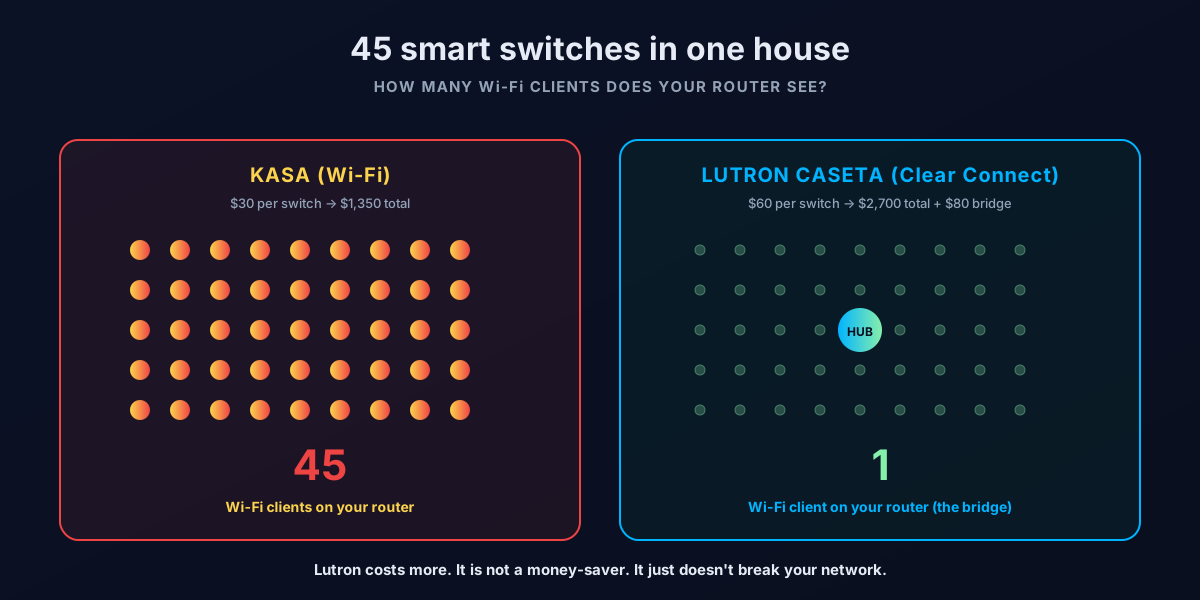
The framing — Lutron is NOT cheaper
Let's get this out of the way in the first paragraph, because every other comparison article online lies about it. Lutron Caseta switches cost more than Kasa switches. Per switch. Upfront. After five years. After ten years. Period.
Walk through the math with us. A house with 45 smart switches — which is a normal full-house install once you count every overhead light, fan, and lamp circuit:
- 45 Kasa Smart switches at $30 each = $1,350
- 45 Lutron Caseta switches at $60 each = $2,700 plus an $80 Smart Bridge = $2,780
- Lutron costs $1,430 more. That's not a rounding error. That's a real check the customer writes.
After 28 years of installing both in client homes — and 44 years of my father in the cable industry watching customers try to save money the wrong way — we still recommend Lutron in almost every case for households over 10 switches. Not because it saves money. Because it works better, and it doesn't fight every other connected device in your house.
The honest case for Lutron isn't "it pays for itself." It's "you get what you pay for, and what you pay for is the rest of your home network not getting wrecked."
That's the case we're going to make.
The two protocols — Clear Connect vs Wi-Fi
This is the single most important difference between Lutron and Kasa. It is not in the marketing copy on the product page. It will determine whether your streaming, video calls, and voice assistants work reliably two years from now.
Lutron Caseta uses Clear Connect
Lutron Caseta uses Clear Connect, a proprietary low-power RF radio Lutron has been refining for over 20 years. Clear Connect operates in the sub-GHz spectrum (around 434 MHz in the US), which is a completely different band from Wi-Fi (2.4 GHz, 5 GHz, 6 GHz). It is purpose-built for lighting control — high reliability, low bandwidth, multi-decade battery life on the pico remotes.
The switches don't talk to your Wi-Fi router. They talk to the Lutron Smart Bridge (or the Caseta Smart Hub, or the Pro Hub for professional installs). The bridge is the only Lutron device that connects to your home Wi-Fi network. Every switch in the house — whether it's 5 switches or 200 switches — communicates via Clear Connect to that single bridge.
Net effect on your router: one device. Forever. Regardless of switch count.
Kasa uses Wi-Fi per device
Kasa Smart switches (made by TP-Link) connect to your home Wi-Fi directly. Every switch in your house is its own Wi-Fi client on your router — like a phone, a laptop, or a tablet.
Net effect on your router: one Wi-Fi client per switch. 45 switches = 45 Wi-Fi clients added to your network. They join the 30 phones, tablets, TVs, smart speakers, cameras, doorbells, and thermostats already there.
Why this matters in real homes
Consumer Wi-Fi routers — including most mesh systems sold before 2024 — are built for 30 to 50 simultaneous clients. Past that count, you start seeing:
- Streaming devices buffer during peak hours
- Video calls drop or pixelate
- Voice assistants respond slowly or "I'm having trouble"
- New devices fail to connect for several minutes
- Random Wi-Fi devices "disappear" from the network and need to be rebooted
The household pays for gigabit fiber and still has Netflix buffering. They blame the ISP. The actual problem is that they bought 45 Kasa switches three years ago and the router is now juggling 75 concurrent Wi-Fi clients on hardware sized for 30.
🛠️ The line we say in client homes: "Every Wi-Fi smart device you add is one more mouth at the dinner table. The router has to keep checking in with each one — even when nothing's happening. You don't notice it at 10 devices. You notice it at 60."
The household impact at 45 switches — Rick's install business case study
This is the real case study. A client in a 4,500 sq ft house in McLean, Virginia. Their daughter started having Netflix buffering issues in the upstairs bedroom about a year after the smart-home build-out finished.
We came back to diagnose. Standard checks first — speed test at the router, speed test at the upstairs AP, wireless interference scan. All clean. 1 Gbps fiber, eero Pro 6E mesh, three nodes. Should have been flawless.
Then we counted Wi-Fi clients on the eero dashboard:
- 6 phones / tablets / laptops
- 4 smart TVs + 3 streaming devices
- 2 Sonos speakers, 4 Amazon Echos, 2 Google Nest Minis
- 5 Wi-Fi cameras (Ring, Nest)
- 3 Wi-Fi thermostats
- 1 Wi-Fi garage door opener
- 1 smart fridge, 1 smart washer-dryer pair, 1 robot vacuum
- 45 Kasa smart switches
Total: 78 Wi-Fi clients. On a 3-node mesh rated for 75. Right at the wall.
The fix wasn't a new router. The fix was ripping out 45 Kasa switches and replacing them with 45 Lutron Caseta switches plus a Lutron Smart Bridge. After the swap:
- Wi-Fi client count dropped from 78 to 34
- Streaming buffering disappeared completely
- Voice assistants got noticeably snappier
- The same 1 Gbps fiber + same eero mesh suddenly felt like a different network
That rip-and-replace cost the homeowner about $4,500 including our labor. The honest framing for them: the Kasa decision three years earlier had cost them $1,350 upfront — and then $4,500 to undo, plus two years of a worse home.
If they'd installed Lutron from day one, they would have spent $2,780 upfront and saved $3,050 in rework. That's the real math.
Side-by-side feature comparison
Here's the spec sheet, honest version:
| Feature | Lutron Caseta | Kasa Smart |
|---|---|---|
| Price per switch | $50-70 | $20-30 |
| Hub required | Yes (Smart Bridge, ~$80) | No |
| Protocol | Clear Connect RF (proprietary, sub-GHz) | 2.4 GHz Wi-Fi |
| Wi-Fi clients added | 1 (the bridge) | 1 per switch |
| Max devices supported | 75 per bridge (Pro: 200+) | Limited by your router |
| Dimmer + on/off | Both, all switches | Both, model dependent |
| Scenes / automations | Yes, via app or bridge | Yes, via Kasa app |
| Alexa integration | Yes, native | Yes, native |
| Google Home | Yes, native | Yes, native |
| Apple HomeKit | Yes, native | Limited (Matter via firmware) |
| SmartThings | Yes | Yes |
| Geofencing | Yes (via app) | Yes (via app) |
| Schedules / timers | Yes | Yes |
| Away-from-home control | Yes (via bridge cloud) | Yes (via TP-Link cloud) |
| Manual switch still works if internet is down | Yes (Clear Connect is local-only) | Yes (switch operates locally) |
| App quality | Solid, mature | Solid, frequent updates |
| Energy monitoring | No | Yes (on some models) |
| Open API for installers | Yes, full Lutron API | Limited, Kasa cloud only |
| Company age | Founded 1961 | TP-Link founded 1996 |
| Made in | USA (most product lines) | China |
| Warranty | 1 year retail, 5+ year pro | 2 years |
The honest read: Kasa wins on price, energy monitoring, and the no-hub requirement. Lutron wins on network architecture, HomeKit/SmartThings integration depth, company longevity, professional installer API, and the manual reliability of a switch that doesn't need your Wi-Fi to be working.
[Sources: Lutron Caseta product spec sheet (lutron.com/caseta), TP-Link Kasa product line (kasasmart.com), RTINGS smart home category notes.]
When Kasa is actually fine
We are not anti-Kasa. We install Kasa in client homes too. The right scale for Kasa:
Under 10 smart switches in the house. A studio apartment with 4 Wi-Fi outlets and 2 Wi-Fi switches is a perfect Kasa use case. The Wi-Fi load is trivial, the cost savings are real, and you don't need a hub on the wall.
No plans to scale. If you know yourself and you know you're not going to keep adding smart devices forever, Kasa works. The danger is the slippery slope — every household I've installed for that started with "just five Kasa switches" ended up at 30+ within two years. Smart-home creep is real.
Renters. Kasa switches can be removed and re-installed at the next house. Lutron switches can too, but the bridge + ecosystem investment hurts more when you're not staying long.
Houses with modern Wi-Fi 6 / 6E / 7 mesh and gigabit fiber. A modern mesh handles 75+ clients comfortably. If you've already got an eero Pro 7 or Orbi 970, you have more network headroom for Wi-Fi switches than someone running a 2017 Asus router. That doesn't make Kasa the right answer — it just means the failure mode is less severe.
🛠️ The honest line: If you're going to live in a 3-Kasa-switch apartment for two years, buy Kasa. If you're going to live in a house and you're going to add smart stuff every birthday and Christmas for the next decade — buy Lutron from the start.
When Lutron is the right call
Houses with 10+ switches or that plan to scale past 15. Once you cross that threshold, the network load math flips. The $30/switch premium pays for itself in network reliability across every other connected device in the house.
Multi-story homes. More floors means more dead zones, which means your router is already working harder. Adding Wi-Fi switch load on top of that compounds the problem. Hub-based Lutron sidesteps it entirely.
Households that value reliability over cost. If you bought premium Wi-Fi mesh, premium TVs, premium audio, premium fiber — don't bottleneck all of that with the cheapest smart switches. The build philosophy should match throughout the house.
Households integrating with HomeKit, SmartThings, Control4, Crestron, or Savant. Lutron's open API and 30+ year platform longevity make it the integrator's default. Every professional whole-home control platform supports Lutron natively. Kasa's TP-Link cloud is a closed ecosystem with limited integration depth.
Households with kids' bedrooms / nurseries / older parents. When the Wi-Fi goes out at 11pm and the kids need a light on, you do NOT want their bedroom light controlled by a Wi-Fi switch waiting for the router to come back. Lutron Clear Connect works locally with no internet — the switch on the wall always works whether the network is up or not.
Houses Bear and Rick install for themselves. Both our houses are Lutron throughout. Take that for whatever it's worth.
The integration story — why Lutron wins past 5 years
This is the part nobody talks about in spec sheet comparisons. Lutron isn't just a switch maker. It's a 64-year-old American company with a deep professional installer channel, an open API, and a platform that has been backwards-compatible across every generation of product since the 1990s.
What Lutron integrates with natively:
- Amazon Alexa — direct skill, no bridge through clouds, instant response
- Google Home / Google Assistant — native, snappy
- Apple HomeKit — full HomeKit support including Adaptive Lighting on the Diva line
- Samsung SmartThings — official integration
- Sonos — Lutron Pico remote can directly control Sonos volume + transport
- Ring / Nest / Ecobee — official integrations with scene triggers
- Control4, Crestron, Savant — every major whole-home control system has a native Lutron driver
- Hubitat, Home Assistant, OpenHAB — full local API support for power users
What Kasa integrates with:
- Amazon Alexa — yes, via the Kasa skill
- Google Home — yes
- Apple HomeKit — partial, via newer Matter-over-Wi-Fi firmware on some models. Not all Kasa products. Not all features.
- SmartThings — yes
- Control4 / Crestron / Savant — not supported. Period.
- Local API — limited; most automation requires the TP-Link cloud being up
When TP-Link's cloud has an outage (it has happened multiple times in 2024-2025), every Kasa-using household loses the ability to control switches from the app and loses voice control until the cloud recovers. The switches still work manually on the wall — but the smart-home automations don't.
Lutron's local-control architecture means a Lutron house keeps working even if Lutron Inc. somehow disappears tomorrow. Clear Connect doesn't need their servers.
[Sources: Lutron developer portal (developer.lutron.com), TP-Link Kasa support docs, Control4 driver library.]
The cost math — honest version
Let's lay it out so nobody can accuse us of marketing math:
House with 10 switches (medium home, partial smart)
| Lutron | Kasa | Delta | |
|---|---|---|---|
| 10 switches | $600 | $300 | +$300 |
| Hub (Lutron only) | $80 | $0 | +$80 |
| 5-year total | $680 | $300 | +$380 |
House with 25 switches (typical full smart-home build)
| Lutron | Kasa | Delta | |
|---|---|---|---|
| 25 switches | $1,500 | $750 | +$750 |
| Hub | $80 | $0 | +$80 |
| 5-year total | $1,580 | $750 | +$830 |
House with 45 switches (large home, full coverage)
| Lutron | Kasa | Delta | |
|---|---|---|---|
| 45 switches | $2,700 | $1,350 | +$1,350 |
| Hub | $80 | $0 | +$80 |
| 5-year total | $2,780 | $1,350 | +$1,430 |
In every case, Lutron costs more. Sometimes a lot more. Don't lie to yourself about the math.
The question isn't "will Lutron pay for itself?" The question is "is the $300 to $1,430 worth it for a smart-home system that doesn't fight every other device in your house?"
For the 10-switch household, that answer might genuinely be "no — buy Kasa, it's fine at this scale." For the 25+ switch household, the answer is almost always "yes, especially if you're planning to live in this house long-term."
Why it's still worth it (the honest case)
Five reasons Lutron is worth the premium when you're past the small-scale threshold:
1. Network reliability. Already covered. The single biggest reason. One Wi-Fi client beats 45 every time.
2. Local control without the cloud. Clear Connect operates entirely inside your house. When the internet is out, when TP-Link's cloud hiccups, when your ISP has a regional outage — Lutron keeps working. Manual switches always work. Pico remotes always work. Scenes triggered by motion sensors still work. None of that is true with Wi-Fi switches.
3. Longevity. Lutron has been in the residential lighting controls business since 1961. The original RadioRA system from the early 2000s still works today and is still supported. Caseta launched in 2014 and has had every product since be backwards compatible. Compare that to TP-Link's track record of discontinuing product lines and pushing customers to new ecosystems every 3-5 years.
4. Professional integration support. If you ever want to upgrade to Control4, Crestron, or Savant for whole-home control — Lutron drops in. Kasa doesn't.
5. The switch on the wall feels better. This sounds silly. It isn't. The mechanical action of a Lutron Diva or Caseta dimmer is genuinely premium — quiet, weighted, smooth dimming taper. Kasa switches feel like the $20 product they are. Over 5 years, the daily tactile difference matters.
Bear & Rick's recommendation
After 66 combined years of installing AV and lighting controls in residential properties, here's the recommendation we give every client:
If you have 10+ switches or plan to scale past 15: Lutron Caseta. It costs more. It's worth it. Buy the Smart Bridge, install the switches, never think about your wireless network getting wrecked by smart lighting.
If you have 3-5 Wi-Fi switches and you're staying small: Kasa is fine. Don't over-buy. The Lutron premium doesn't pay off at micro scale, and the network impact at 5 switches is negligible.
The middle ground (6-9 switches): This is the gray zone. Look at your trajectory. If you've added a smart switch every year for three years, you're going to keep adding them. Start the Lutron transition now and you save yourself the eventual rip-and-replace. If you bought 6 switches three years ago and haven't added one since, Kasa probably stays fine.
🛠️ The closing line: "Lutron costs more. Don't buy it because it's cheaper — it isn't. Buy it because at 25 switches it doesn't fight everything else in your house, and at 45 switches it's the only thing that works."
Where to buy
Lutron Caseta — buy direct from Lutron, Amazon, or a Lutron pro installer. Pricing is consistent across retailers. The professional installer channel (Lutron RA2/Homeworks for higher-end whole-home installs) gets a slightly different product line — if you're doing 100+ switches, talk to a pro before buying retail.
- Lutron Caseta Smart Dimmer (Amazon)
- Lutron Caseta Smart Bridge (Amazon)
- Lutron Diva Smart Dimmer (Amazon)
Kasa Smart — Amazon is the default; sometimes Walmart and Best Buy run promotions.
Sources cited in this guide
- Lutron Caseta product line —
lutron.com/caseta - Lutron Smart Bridge spec sheet —
lutron.com/en-US/Products/Pages/SmartBridge/Overview.aspx - TP-Link Kasa Smart product range —
kasasmart.com/us - Lutron developer portal + open API —
developer.lutron.com - r/SmartHome and r/Lutron threads — real-world network load reports
- RTINGS smart home protocol comparison notes
- Reddit r/Lutron mega-threads on Caseta install scale (45+ switches)
- TP-Link cloud outage reports — 2024-2025 incident summaries
Related reading
- The Hidden Reason Your Wi-Fi Is Slow: Smart Home Device Count — the bigger network-load picture that makes the Lutron case go from "nice to have" to "essential"
- Wi-Fi 6 vs Wi-Fi 7 — Which Do You Actually Need? — the router side of the same problem
- Multi-Gig Internet — The Weakest Link Trap — what determines whether your house can actually deliver what you pay for