Spectrum TV Stream Review
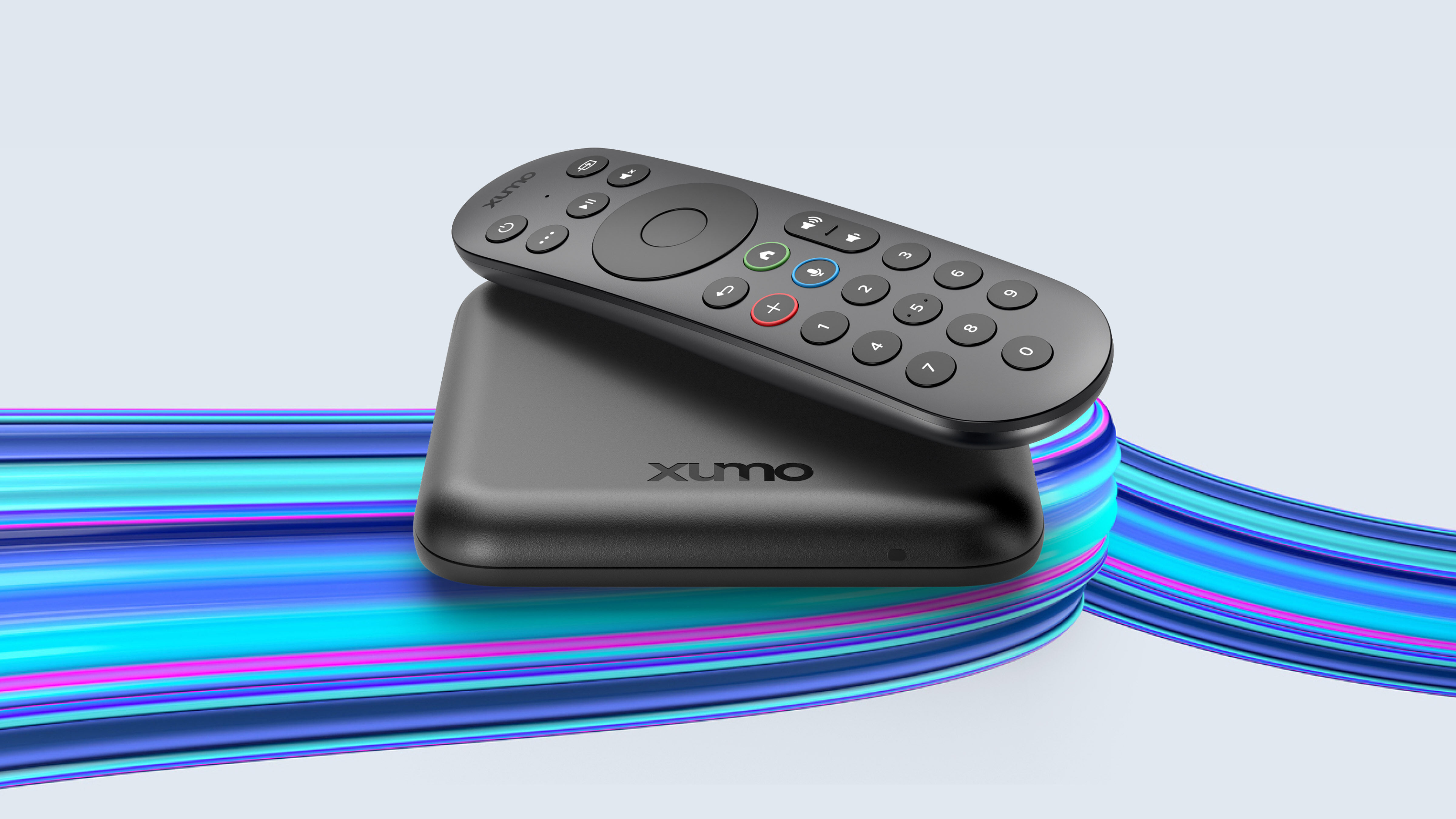
Spectrum's Xumo-based streaming cable box — the modern interface that fixes the slow-guide problem.

Our Take
After installing both traditional Spectrum cable boxes and the newer Spectrum TV Stream — Spectrum's name for the Xumo Stream Box — the honest read is that TV Stream is a meaningful upgrade for almost any household that doesn't depend on Spectrum's deepest channel tiers. The slow-guide problem that defined traditional Spectrum is gone. The remote is cleaner. The built-in streaming apps (Netflix, Disney+, Max, Hulu, Prime, Apple TV+, YouTube) actually deliver on what Spectrum spent years promising and not shipping.
The trade-off is the same trade-off as every streaming-cable box: the bundle determines the channels, and the bundles are smaller than traditional Spectrum cable plans. For most households this is fine — you're keeping the channels you actually watch and dropping the ones you don't. For sports-heavy households or anyone deep in specialty cable channels, the gap matters.
The Wi-Fi reliability question matters here too. Spectrum's coax delivery is genuinely robust. Spectrum TV Stream depends on your home Wi-Fi. If your Wi-Fi is solid, this is a non-issue. If it's marginal, this is a daily friction.
Whether Spectrum TV Stream is right for you depends on the specifics: your bundle's channel lineup vs what you actually watch, your Wi-Fi quality, and how much the per-box savings (vs $13/month for traditional Spectrum boxes) matter to your monthly budget.
The biggest daily frustration — bundle channel-count vs traditional cable
Same caveat as Verizon Fios Stream. The platform itself is solid. The bundle is where the questions live.
Spectrum's traditional cable bundles carry 125–200+ channels depending on tier. Spectrum TV Stream bundles tend to carry 100–175 — close, but not identical. The channels most commonly cut are deeper cable tiers, some specialty channels, and in some markets, certain regional sports networks.
The right way to verify before switching:
- Pull your last 60 days of DVR history.
- List every channel that appears (rolled up — not every show, every channel).
- Compare that list to the Spectrum TV Stream bundle channel list.
- Anything you watch that's not in the bundle? Either it's available through a built-in streaming app (Disney+, Max, Hulu, etc.), it's a real loss, or it's available through a $5/month add-on.
That's the entire decision. The hardware and interface are improvements. The bundle is the question.
When to switch to Spectrum TV Stream
You're a new Spectrum customer signing up for TV. Spectrum is steering new customers toward TV Stream. For most new customers, this is the right call.
You have two or more TVs paying $13/month each for legacy Spectrum boxes. This is where the savings show up. A two-TV household saves ~$200/year. A four-TV household saves ~$600/year.
You're worn down by the legacy Spectrum guide speed. TV Stream's guide is meaningfully faster.
You actually use built-in streaming apps daily. Spectrum TV Stream covers all the major streamers (unlike legacy Spectrum, which only has Netflix and YouTube).
Your Wi-Fi is mesh or wired-backhaul and robust at TV locations. Plays to Stream's strengths.
Your favorite channels are all in the TV Stream bundle. Verify before signing.
When to skip Spectrum TV Stream / keep traditional Spectrum
The TV Stream bundle drops channels you watch. Bundle audit is the deciding factor. Don't switch on assumption.
Your Wi-Fi has dead zones at the TV. Streaming delivery requires reliable Wi-Fi.
You watch live sports and your team plays on a local sports channel that's not in the Stream bundle. This is the most common single reason households stick with legacy Spectrum.
You're a heavy DVR user (100+ hours/month). TV Stream's cloud DVR is smaller than legacy Spectrum's.
Key features (and what they actually mean for you)
The box — Xumo hardware, Spectrum branding
Spectrum TV Stream uses the same Xumo Stream Box hardware as Xfinity Xumo and Cox Contour Stream — just with Spectrum's logo on the front and the Spectrum-branded remote. Small black puck, single HDMI out, Wi-Fi or Ethernet for connectivity.
🧠 Why this matters: the hardware is consistent across Xumo's three cable-provider partners. Movement between providers is easier. The bundle is the differentiator, not the box.
The remote — Xumo voice remote, Spectrum branded
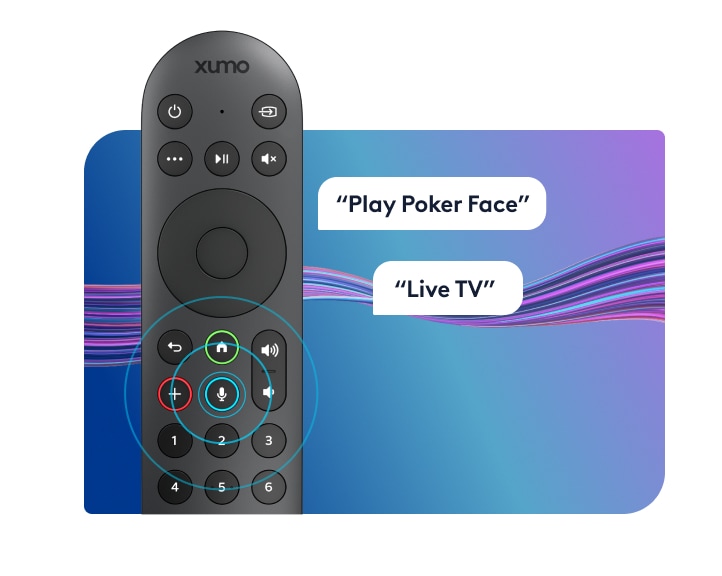
Same cleanly-designed Xumo voice remote across all three providers. ~15 buttons. Voice search across cable and built-in streaming apps. RF for box, IR for TV control.
📡 Why RF beats IR for cable boxes: no line-of-sight required. The Stream box can sit behind the TV — the remote still works.
Channel lineup — provider-specific bundle
Spectrum TV Stream bundle channel counts vary by market. Typical range: 100–175 channels. Local sports channel coverage varies by market and is the place to verify before signing.
🏈 Why this matters: verify YES, MSG, NBC Sports, Bally Sports, etc. coverage in your specific market. The single biggest reason Spectrum TV Stream isn't an upgrade for some households is missing RSN coverage.
Cloud DVR — smaller than traditional cable
Spectrum TV Stream includes cloud DVR scaled to the bundle. Lower tiers: 50 hours. Higher tiers: 100+ hours.
⚠️ The honest caveat: standard cloud-DVR retention limits apply. Recordings older than 12 months may be auto-deleted unless saved. Heavy DVR users feel the constraint.
Built-in streaming apps — Spectrum TV Stream's real advantage
What's actually built in:
- ✓ Netflix
- ✓ Prime Video
- ✓ Disney+
- ✓ Hulu
- ✓ Max (HBO)
- ✓ Apple TV+
- ✓ YouTube
- ✓ Peacock, Paramount+, Pluto TV, and a few dozen more
What's NOT built in:
- ✗ YouTube TV (direct competitor)
- ✗ Sling TV (similar reason)
🎮 What this means in practice: Spectrum TV Stream's built-in app integration is the meaningful upgrade over legacy Spectrum. Cable + every major streaming service on the same remote and the same HDMI input. The two-remote, two-input dance that defined the legacy platform is largely solved.
The remote — modern by cable standards
| Remote feature | Spectrum TV Stream Remote | Roku Voice Remote Pro 2 | Apple Siri Remote |
|---|---|---|---|
| RF / Bluetooth — hide the box | ✓ RF/Bluetooth | ✓ Bluetooth | ✓ Bluetooth |
| Voice search across channels and apps | ✓ Excellent | ✓ "Hey Roku" hands-free | ✓ Siri (press to talk) |
| Controls TV power, volume, input | ✓ IR | ✓ Most TVs | ✓ Built-in IR + CEC |
| Headphone jack on remote | ✗ | ✓ | ✗ |
| Lost-remote finder | ✗ | ✓ | ✗ |
| Backlit buttons | ✗ | ✓ | ✗ |
| Button count | ~15 (much cleaner than legacy Spectrum) | ~12 | ~7 |
| Battery / charging | 2× AAA (~6 mo) | Rechargeable USB-C | Built-in rechargeable, USB-C |
The Spectrum TV Stream remote is the cleanest remote Spectrum has shipped. Modern button count, reliable voice search, RF for hiding the box.
What it isn't is the feature-rich Roku or Apple TV remote experience. Standard streaming-cable remote.
Closed captions, parental controls, and accessibility
Solid across the board. Captions fully customizable. ADA-compliant. Parental controls PIN-locked. Audio descriptions and screen-reader support available.
Box rental costs (you cannot buy them)
Spectrum TV Stream is rental-only. The first box is typically included free with the TV bundle. Additional Stream boxes for secondary TVs rent for ~$5/month each.
| Per box | Per year | 5-year cost | |
|---|---|---|---|
| First Stream box | Included free with TV bundle | $0 | $0 |
| Each additional box | ~$5/month | $60 | $300 |
| Typical 2-TV setup | ~$5/month | $60 | $300 |
| Typical 4-TV setup | ~$15/month | $180 | $900 |
💡 The math that actually matters: the per-box delta vs legacy Spectrum is the real saving. Legacy Spectrum: $13/month per box on every TV. Stream: $5/month per additional box, first free. A four-TV household saves ~$2,200 over five years on box rentals alone.
The three real options compared
Numbers below are for a typical two-TV setup on Gigabit Internet:
| Item | Keep legacy Spectrum cable | Switch to Spectrum TV Stream | Cut TV — keep Internet only |
|---|---|---|---|
| Internet | $79.99/mo | $79.99/mo | $79.99/mo |
| TV service | $69.99/mo (TV Select) | $59.99/mo (Stream Select) | — |
| Box rental (2 TVs) | $26/mo (no free box) | $5/mo (1st free + 1) | — |
| Fees & taxes | ~$20/mo | ~$10/mo | ~$3/mo |
| Replacement service | — | — | $82.99/mo (YouTube TV) |
| Monthly total | ~$196/mo | ~$155/mo | ~$166/mo |
| Channel count | 125+ | 100–175 (bundle-dependent) | 100+ (YouTube TV) |
| Local sports channels | Full | Verify per market | Usually missing |
| DVR | Cloud + upgrade | Cloud, smaller storage | Unlimited cloud |
| Reliability | Coax-reliable | Wi-Fi dependent | Wi-Fi + service dependent |
| Remote / inputs | One remote, one input | One remote, one input | One remote, one input |
| Service calls | A few per year typical | Rare | Rare |
Spectrum TV Stream is cheaper than legacy Spectrum AND fixes the slow-guide problem AND adds real app integration. Cutting the cord lands close on cost while trading full channel coverage for unlimited cloud DVR.
What's missing
Full channel parity with legacy Spectrum. Bundle is smaller. Verify before switching.
Coax-grade reliability. Wi-Fi delivery means Wi-Fi-quality results.
Cloud DVR storage matching legacy plans. Cap is lower.
Purchase option. Rental-only.
Who this is best for
Best for new Spectrum TV customers. Modern interface, real app integration, lower per-box fees.
Best for multi-TV legacy Spectrum households tired of $13/box. The savings show up here.
Best for households who actually use built-in streaming apps daily. The integration is the upgrade.
For everyone else — sports households depending on local sports channels Stream doesn't carry, marginal-Wi-Fi homes, heavy DVR users — legacy Spectrum or YouTube TV is worth real consideration.
Prices vary by market. The best way to see exactly what you'd pay across all three options is to run the quiz with your ZIP code — we'll show you real numbers for your address.
More photos
Where to rent
Boxes are rental-only — you cannot purchase them. Rate is per box, per month, billed by Verizon as part of your service.
Setup tips from a pro installer 8 tips · click to expand
- Verify your channel lineup before signing Spectrum TV Stream's bundle channel count varies by market. Some bundles drop channels traditional Spectrum carries. Pull the bundle's channel list and compare to what you actually watch (your DVR history is a good proxy).
- Hardwire if you can Spectrum TV Stream has Ethernet. Use it. Wi-Fi delivery works but a wired drop fixes the most common big-game buffering issue.
- Activate all your built-in apps day one Spectrum TV Stream runs Netflix, Disney+, Max, Hulu, Prime, Apple TV+, YouTube, Peacock natively. Sign in to everything you already pay for during install.
- Configure cloud DVR priorities early Cloud DVR storage is included but smaller than legacy Spectrum's. Set up series-record priorities the day of install.
- Pair the voice remote correctly Follow the on-screen pairing prompts. Spectrum TV Stream's Xumo remote pairs more reliably than the legacy Spectrum Sleek remote, but pairing during install is still required.
- Adjust audio for soundbar Settings → Audio → Surround Sound 'Auto' or 'Pass-through.' Default is sometimes stereo.
- Use the Spectrum app for second-screen viewing Same Spectrum TV app as the legacy cable box. Streams live channels and DVR recordings to phones and tablets.
- Skip 'free trial' add-ons at signup Spectrum loves to bundle add-on tiers that auto-renew at full price. Decline anything not in the base bundle — you can always add later.