Xumo Stream Box Review (Xfinity / Spectrum / Cox)
The shared streaming box Comcast, Spectrum, and Cox are pushing new customers toward — what it does, what it doesn't, and whether it's a real upgrade.
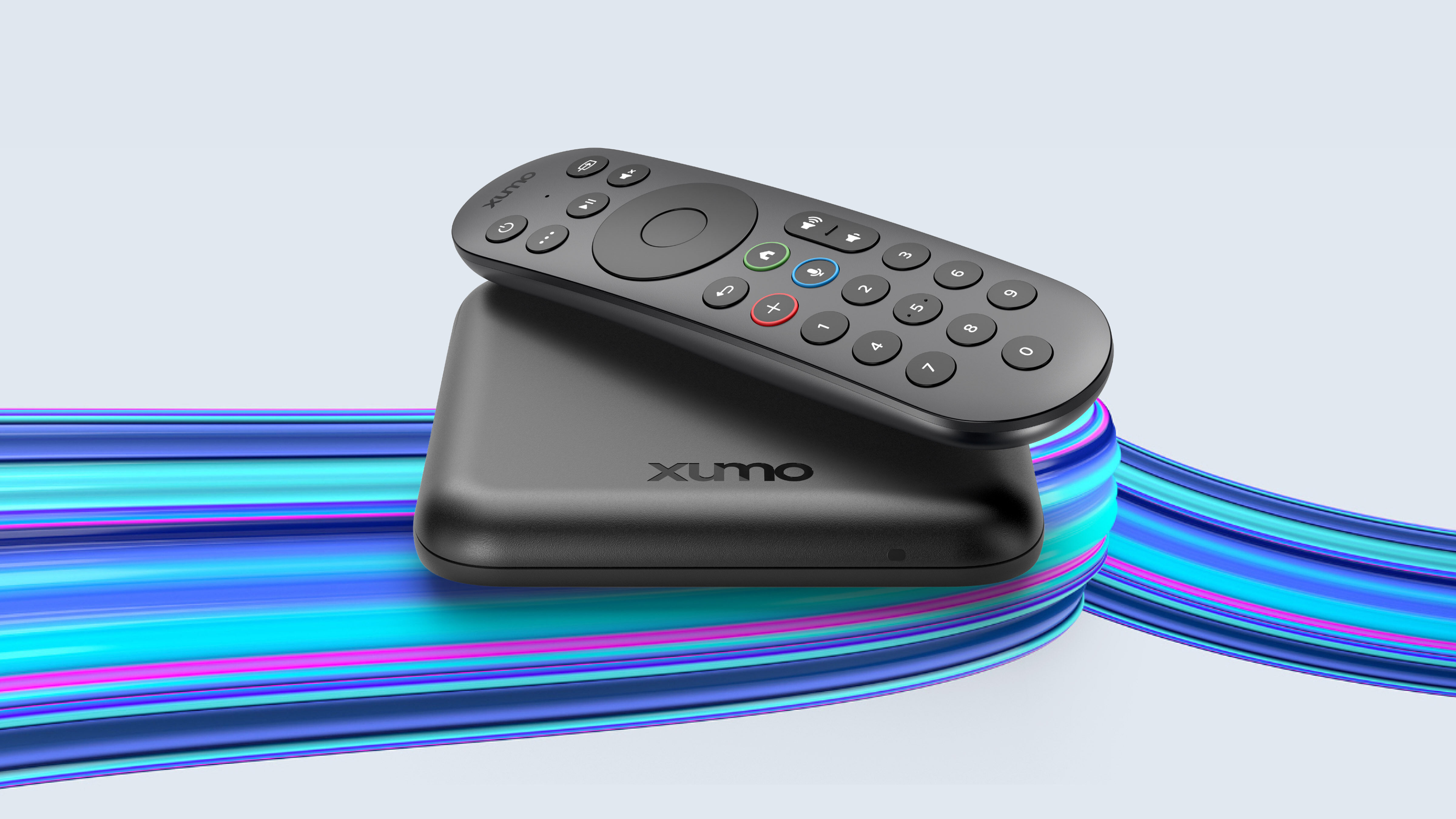



Our Take
After years of putting cable boxes in clients' homes, the Xumo Stream Box is the first major industry pivot away from the traditional set-top. Comcast and Charter (Spectrum) formed the Xumo joint venture in 2022 specifically to replace the boxes both companies had been shipping for decades. Cox followed quickly with the same hardware under its own branding. So when a tech rolls up to your house in 2026 with a "new" cable box — there's a strong chance it's a Xumo, even if the logo on the front says Xfinity, Spectrum, or Cox.
The good news: the Xumo Stream Box is genuinely a better daily experience than any traditional cable box. It's small (about the size of an Apple TV), the interface is fast, the remote is clean, the built-in streaming app story is real (Netflix, Prime, Disney+, Max, Hulu, Peacock, Apple TV+, YouTube all run natively), and the box is usually free with the TV bundle. From an install standpoint, it's the cleanest cable setup any provider has shipped.
The trade-offs are the streaming-box trade-offs. Wi-Fi delivery instead of coax. Smaller cloud DVR than a traditional cable plan. Bundle channel counts that vary materially by provider and market — what's in your Xfinity Xumo bundle isn't the same as what's in your Spectrum Xumo bundle. And because the bundle is what determines the channels, switching from traditional cable to Xumo isn't always a clean lateral move.
Whether Xumo is right for you depends on the specifics: whether your specific provider's bundle carries what you watch (especially local sports channels — YES, MSG, NBC Sports, etc.), whether your Wi-Fi is reliable enough for big games, and whether the cost savings vs your current cable bill justify the channel-lineup changes.
The biggest daily frustration — bundle confusion across providers
The thing that wears Xumo customers down most isn't the hardware. It's the bundle ambiguity.
A Xumo Stream Box delivered through Xfinity is called the "Xumo Stream Box." A Xumo Stream Box delivered through Spectrum is called "Spectrum TV Stream." A Xumo Stream Box delivered through Cox is called the "Cox Contour Stream Player." The hardware is essentially the same. The remote is essentially the same. The interface is essentially the same.
The bundle? Different at every provider.
I've had clients sign up for "the same Xumo box" their neighbor has and discover their channel lineup is materially different. Different RSN coverage. Different sports tiers. Different number of broadcast networks. Different DVR storage. Different price.
The Xumo platform itself is consistent. The provider's bundle on top of it isn't. Read your specific bundle's channel lineup before you sign, especially if you're choosing Xumo specifically because your neighbor said it was a good deal.
When to keep / switch to Xumo Stream Box
You're a new TV customer who hasn't signed up yet. Xumo is what your provider is pushing — and for new customers, it's almost always the better deal vs the traditional cable box. Smaller monthly cost, faster interface, real streaming apps, no per-box fees on every TV.
You're getting forced off your old cable box. Comcast, Spectrum, and Cox are gradually phasing the old hardware out. If your provider tells you the X1, Worldbox, or Contour box you have is being retired in your area, Xumo is the upgrade path.
You actually use streaming apps and want them on the same remote. Xumo's built-in app integration is real and works well. If your household uses Netflix + Disney+ + Max + Hulu daily, Xumo unifies them with live cable on one remote and one HDMI input.
You have one or two TVs. Xumo's small size and Wi-Fi delivery makes installing a box on a secondary TV trivial — no coax drop needed.
Your Wi-Fi is wired-backhaul mesh or fiber with strong signal at the TVs. Xumo lives or dies on Wi-Fi quality. If yours is solid, Xumo works. If yours is marginal, Xumo will buffer during big games and you'll regret it.
Your provider's specific bundle carries the local sports channels (YES, MSG, NBC Sports, etc.) you watch. Verify this. It's the single biggest gotcha.
When to skip Xumo
You're a heavy live-sports household with marginal Wi-Fi. A coax-delivered traditional cable box never buffers during the Super Bowl. Xumo (and any streaming-based box) can. If your team's playoff run can't tolerate a single Wi-Fi hiccup, stay on traditional cable for now.
Your specific provider's Xumo bundle drops channels you watch. Bundle audits matter. If you currently have 220 channels and the Xumo bundle has 140 of them — and the missing 80 includes your team — Xumo isn't an upgrade.
You record 100+ hours of content monthly. Xumo's cloud DVR is smaller than a traditional cable plan's. Heavy DVR users feel the constraint.
You have four or more TVs and you're already on a per-box-fee structure with significant savings vs Xumo's bundle pricing. Run the math; don't assume.
Key features (and what they actually mean for you)
The box itself — small, wireless, branded per-provider
The Xumo Stream Box is roughly the size of an Apple TV — a small black puck that sits on the TV stand or behind the TV. Wi-Fi or Ethernet for connectivity. Single HDMI out.
Xfinity branding — "Xumo Stream Box" with Xfinity logo on the remote.
Spectrum branding — "Spectrum TV Stream Box" with Spectrum logo. Same hardware.
Cox branding — "Cox Contour Stream Player" with Cox logo. Same hardware.
🧠 Why this matters: the consistency is good — moving between providers means the hardware experience stays similar. The bundle ambiguity is the catch (see above).
The remote — clean and modern by cable standards
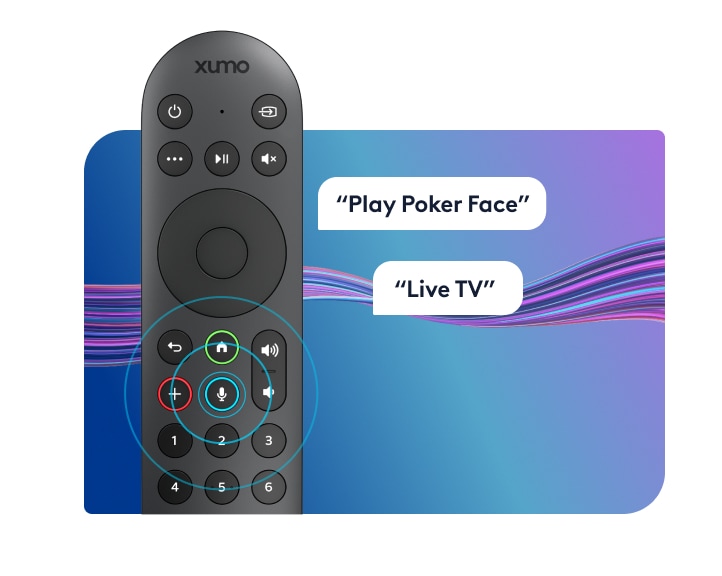
The Xumo voice remote is significantly cleaner than any traditional cable remote. Fewer buttons (~15 vs the 30+ on a traditional remote). Voice search across cable AND built-in streaming apps. Standard RF + IR for box and TV control.
📡 Why RF beats IR for cable boxes: no line-of-sight required. The Xumo box can sit behind the TV or in a cabinet — the remote still works.
What it isn't is feature-rich the way streaming-box remotes have become. No headphone jack. No lost-remote finder. No backlit buttons. Functional and clean.
Channel lineup — provider and bundle-specific
This is where the platform diverges by provider:
Xfinity Xumo bundles: typically 100–180 channels depending on tier. Local sports channels (YES, MSG, NBC Sports, etc.) vary by market.
Spectrum TV Stream bundles: typically 125–175 channels. Strong local sports coverage in Spectrum's coverage areas.
Cox Contour Stream bundles: typically 100–150 channels. Local sports coverage varies more than Spectrum's.
🏈 Why this matters: verify the bundle's local sports channel coverage before signing. The single biggest reason Xumo doesn't work for some households is missing RSN coverage.
Cloud DVR — present but smaller
Xumo includes cloud DVR storage scaled to the bundle. Lower tiers get 20–50 hours; higher tiers get 100+ hours. Multi-room playback via the provider's app.
⚠️ The honest caveat: cloud DVR retention is shorter than traditional cable plans typically offer. Recordings can expire after 90 days on lower tiers. Don't treat Xumo cloud DVR as long-term archive.
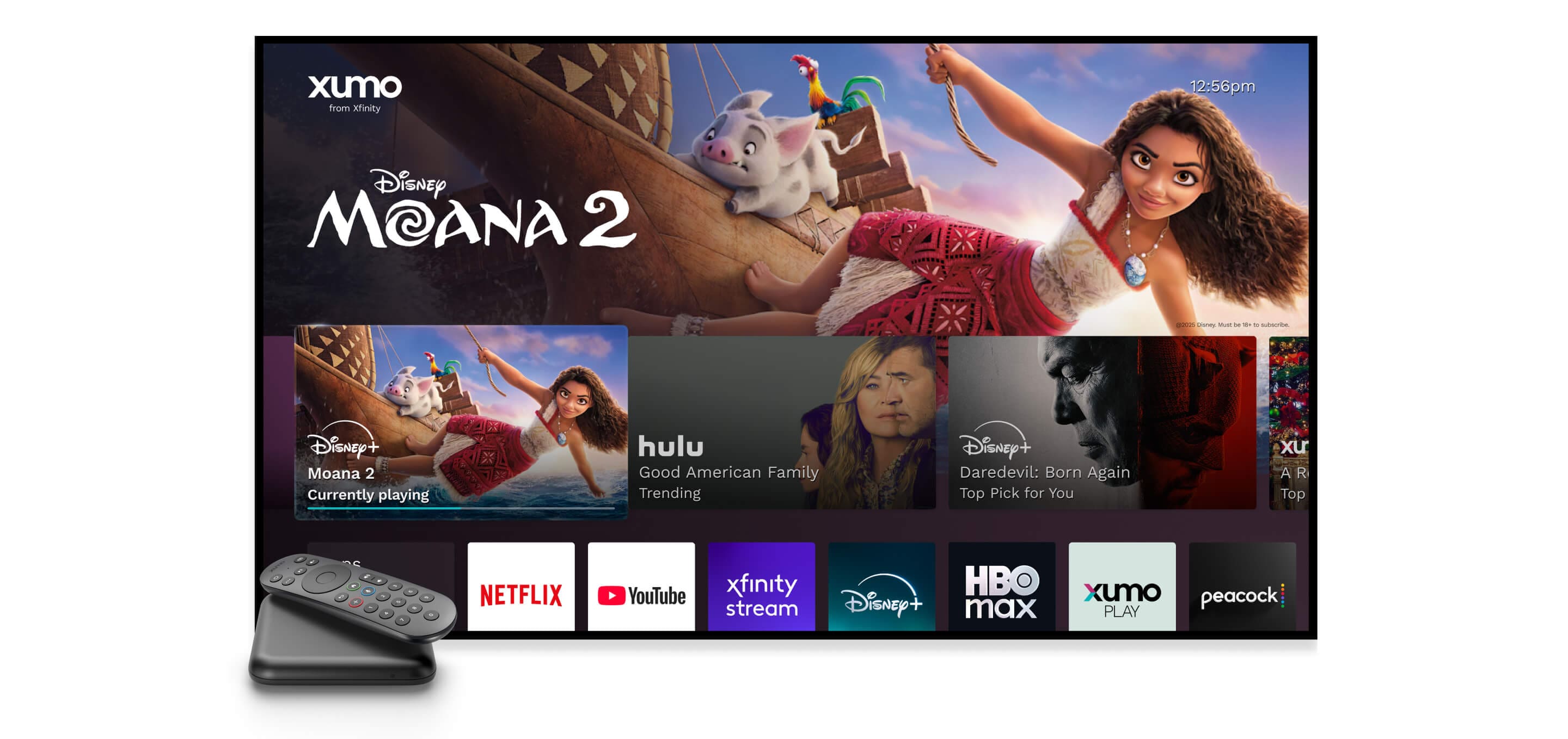
Built-in streaming apps — genuinely useful
This is Xumo's real edge.
What's actually built in:
- ✓ Netflix
- ✓ Prime Video
- ✓ Disney+
- ✓ Max (HBO)
- ✓ Hulu
- ✓ Peacock
- ✓ Apple TV+
- ✓ YouTube
- ✓ Paramount+, Pluto TV, and dozens of others
What's NOT built in:
- ✗ YouTube TV (direct competitor)
- ✗ Sling TV (similar reason)
🎮 What this means in practice: Xumo is the first cable-replacement platform where you actually live on one remote and one HDMI input for nearly everything. Cable channels + every major streaming service + voice search across all of them. This is the experience Fios, Spectrum traditional, and Cox traditional kept promising and never delivered.
The remote — clean for cable
| Remote feature | Xumo Voice Remote | Roku Voice Remote Pro 2 | Apple Siri Remote |
|---|---|---|---|
| RF / Bluetooth — hide the box | ✓ RF/Bluetooth | ✓ Bluetooth | ✓ Bluetooth |
| Voice search across channels and apps | ✓ Excellent (cable + all built-in apps) | ✓ "Hey Roku" hands-free | ✓ Siri (press to talk) |
| Controls TV power, volume, input | ✓ IR | ✓ Most TVs | ✓ Built-in IR + CEC |
| Headphone jack on remote | ✗ | ✓ | ✗ |
| Lost-remote finder | ✗ | ✓ | ✗ |
| Backlit buttons | ✗ | ✓ | ✗ |
| Button count | ~15 (much cleaner than traditional cable) | ~12 | ~7 |
| Battery / charging | 2× AAA (~6 mo) | Rechargeable USB-C | Built-in rechargeable, USB-C |
The Xumo remote is the cleanest cable-provider remote on the market right now. Button count is down to ~15 — closer to streaming-box remotes than traditional cable remotes. Voice search is reliably good across cable channels AND all the built-in streaming apps.
What it isn't is on par with the Roku Voice Remote Pro 2's full feature set (headphone jack, lost-remote finder, backlit buttons). Functional and modern, not feature-leading.
Closed captions, parental controls, and accessibility
Solid. Captions are fully customizable. ADA-compliant. Parental controls PIN-locked at the box level. Audio descriptions and screen-reader support for accessibility.
Box rental costs (you cannot buy them — through providers)
Xumo Stream Box is rental-only through Xfinity, Spectrum, and Cox. The box itself is often free with the TV bundle, with some providers charging ~$5/month for additional boxes on secondary TVs.
| Per box | Per year | 5-year cost | |
|---|---|---|---|
| First Xumo box | Free with most TV bundles | $0 | $0 |
| Each additional box | ~$5/month (provider-dependent) | $60 | $300 |
| Typical 2-TV setup | ~$5/month | $60 | $300 |
| Typical 4-TV setup | ~$15/month | $180 | $900 |
💡 The math that actually matters: Xumo's biggest cost advantage is the free-or-near-free additional-box pricing. A four-TV Xumo household spends $900 over five years on boxes vs $2,880 on Cox Contour or $3,120 on Spectrum traditional. The actual TV bundle price is similar across all three options — the savings come from the box-rental delta.
The three real options compared
Numbers below for a typical two-TV Xfinity Xumo bundle:
| Item | Keep traditional cable box | Switch to Xumo Stream Box | Cut TV — keep Internet only |
|---|---|---|---|
| Internet | $80/mo | $80/mo | $80/mo |
| TV service | $89/mo | $20–$70/mo (bundle varies) | — |
| Box rental (2 TVs) | $10/mo (Xfinity) or $26/mo (Spectrum) | $0–$5/mo | — |
| Fees & taxes | ~$22/mo | ~$8/mo | ~$3/mo |
| Replacement service | — | — | $82.99/mo (YouTube TV) |
| Monthly total | ~$201/mo | ~$108–$163/mo | ~$166/mo |
| Channel count | 220+ | 100–180 (bundle-dependent) | 100+ (YouTube TV) |
| Local sports channels | Full | Bundle-dependent | Usually missing |
| DVR | 60–150 hr cloud + local | 20–100 hr cloud | Unlimited cloud |
| Reliability | Coax-reliable | Wi-Fi dependent | Wi-Fi + service dependent |
| Remote / inputs | One remote, one input | One remote, one input | One remote, one input |
| Service calls | A few per year typical | Rare | Rare |
Read carefully — Xumo is materially cheaper than traditional cable AND fixes most of the legacy platform frustrations (ads on Xfinity, slow guide on Spectrum, pairing flakes on Cox). The catch is bundle-specific channel coverage. Cutting the cord entirely lands in the middle on cost but trades full channel coverage for cloud DVR and platform flexibility.
What's missing
Consistency across provider bundles. The hardware is the same; the channel lineup isn't. Compare bundles carefully.
Coax-grade reliability. Wi-Fi delivery means Wi-Fi-quality results. Big-game households should test before committing.
A purchase option. You can't buy a Xumo box outright from the cable providers — they're tied to bundles.
Long-term clarity on RSN coverage. Local sports channel licensing is in flux across the industry. Today's Xumo bundle may add or drop RSNs without notice.
Who this is best for
Best for new customers signing up for cable TV in 2026. Xumo is what your provider is pushing, and it's the cleanest cable experience available right now.
Best for households who use major streaming apps daily alongside live cable. The built-in app integration is the real selling point.
Best for households with reliable Wi-Fi and one or two TVs. Xumo's strengths play to this configuration.
For everyone else — heavy multi-TV homes with traditional bundles that work, marginal-Wi-Fi households, or anyone whose provider's Xumo bundle drops channels they watch — keeping the traditional cable box or cutting the cord is worth real consideration.
Prices vary by market. The best way to see exactly what you'd pay across all three options is to run the quiz with your ZIP code — we'll show you real numbers for your address.
More photos
Where to rent
Boxes are rental-only — you cannot purchase them. Rate is per box, per month, billed by Verizon as part of your service.
Setup tips from a pro installer 8 tips · click to expand
- Confirm what's in your specific provider's Xumo bundle Xumo Stream Box delivers different channels depending on whether you're getting it through Xfinity, Spectrum, or Cox. Bundle channel counts vary materially. Check the bundle's lineup before you sign anything.
- Hardwire if you can Xumo has Ethernet. Use it — Wi-Fi works but a wired drop eliminates the most common 'buffering on big games' complaint. The box is small enough that running a short ethernet cable behind the TV is easy.
- Sign into your existing streaming services on day one Netflix, Prime Video, Max, Disney+, Hulu, Peacock, Apple TV+, YouTube — all run as native apps on Xumo. Sign in to whatever you already pay for during install rather than rediscovering them later.
- Set up cloud DVR priorities early Xumo bundles include some cloud DVR (smaller than a traditional cable plan's). Configure series-record priorities the day you install so the box catches the right shows from day one.
- Adjust audio output for soundbar Settings → Audio → Surround Sound 'Auto' or 'Pass-through.' Default is sometimes stereo, which downmixes premium audio.
- Customize the home screen ordering Most Xumo variants let you reorder the rows of apps and content. Push your most-used apps to the top so the home screen feels like yours rather than a generic carousel.
- Verify local sports channel coverage Xumo bundles vary on regional sports networks. Some markets carry full YES/MSG/NBC Sports; others substitute streaming-only RSN apps. Verify in your bundle before assuming.
- Skip the 'try it for $5' add-ons Xumo bundles often offer trial add-ons (extra channel packs, premium tiers) that auto-renew at full price. Decline at install — you can always add later.